The video provides a highly actionable, step-by-step workflow for a common pain point (creating presentations) using accessible AI tools, making it valuable for viewers looking to improve their productivity.
Summary
The creator demonstrates a workflow for creating presentations quickly by using Claude AI to generate the content and structure, then importing the file into Canva for design customization. This method allows for rapid creation while maintaining the ability to refine the visual style.
Structure
1Introduction to the AI presentation workflow
2Prompting Claude AI for content and format
3Reviewing the AI-generated output
4Downloading and importing the file into Canva
5Customizing the design and layout in Canva
6Final thoughts on efficiency and customization
Original caption
Creating presentations used to take me hours. Now, here’s the workflow I use: I start with Claude AI. I give it my ideas, and it builds the first version of my slides. Then I move to Canva to customize the design and make it feel like me. This approach saves time while still giving me full creative control. If you’re in a rush, you can stick with AI. If you have more time, you can refine and polish it further. Both work — it just depends on your time. AI doesn’t replace the process, it speeds it up. Best part? You can do all of this for free. #ai #presentationtips #claudeai #promptengineering
More from @the_ai_girl1
Their other posts in the index, biggest breakout first.
Product placement
Claude AI is used to generate the presentation content and structure. Canva is used to edit and customize the design.
Call to action
Follow for more AI tips, like & share this post, drop a comment.
On-screen text
Get Pro
hanan returns!
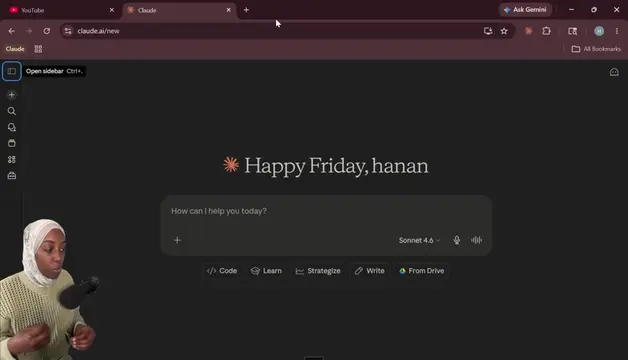
How can I help you today?
Sonnet 4.6
create for my presentation for content based on the script and I want it to in three yellow highlights, black for my text, white for background.
Video Script - Understanding Prompts
How They Work Together
Closing
Understanding prompts: system vs user prompts
Working
Reading pptxgenjs
Setup pptxgenjs
Creating the LinkedIn presentation on Understanding Prompts
Understanding_Prompts.pptx
Ask Canva
AI LITERACY SERIES
Understanding Prompts
The foundation of working with AI
What is a Prompt?
User Prompts
System Prompts
THE BASICS
What is a Prompt?
A prompt is the instruction or input that you give to an AI so it can generate a response.
Every time you ask an AI to do something, you're giving it a prompt.
Common examples:
"Explain what machine learning is."
"Write me an essay about climate change."
"Help me summarize this article."
That message you typed... that's a prompt.
MESSAGE ROLES
Prompts Are Organized into Roles
In AI systems, prompts are categorized into message roles. The two most important ones:
SYSTEM PROMPT
USER PROMPT
DEEP DIVE
The User Prompt
The user prompt is the one most people are familiar with - the message you type when you interact with the AI.
AI Chat interface
"How do I make an omelette?"
"Explain prompt engineering to me."
"What are the real estate prices in this area?"
Whenever you're chatting with an AI, you are sending user prompts.
BEHIND THE SCENES
Your System Prompt
Written by developers - hidden from users - but it shapes every single response.
Example System Prompt (for a Real Estate Chatbot)
"You are a real estate assistant. You help users with questions about property listings, prices, and buying or renting homes. If a user asks something unrelated to real estate, politely tell them you can't answer that question."
Role
Define who the AI is
Task
Sets how it communicates
Rules
What it can or cannot do
The user never sees this instruction - but it shapes every single response.
SIMPLE ANALOGY
A Simple Way to Think About It
SYSTEM PROMPT
USER PROMPT
= JOB DESCRIPTION
= THE ORDER
"You are a professional chef working in a French restaurant. Be polite and professional."
"I'd like a medium-rare steak, please."
The job description defines who you are. The order tells you what to do.
THE FULL PICTURE
How They Work Together
01 Every AI interaction has BOTH prompts working simultaneously - even if you only see one.
02 There is often a hidden instruction layer guiding the AI, shaping every answer it gives you.
KEY TAKEAWAYS
What You Know Now
Prompt
Any instruction or input you give to an AI to get a response.
User Prompt
The message YOU type - questions, tasks, requests.
System Prompt
Hidden instructions that define the AI's role, tone, and rules.
3. Next: How to craft powerful prompts that get better results from AI
"When you learn how to design better prompts - you learn how to guide the AI to produce better results."
Follow for more AI tips
Like & share this post
Drop a comment
Ask Canva
AI LITERACY SERIES
Understanding Prompts
The foundation of working with AI
What is a Prompt?
User Prompts
System Prompts
Page 1/9
Page 2/9
Page 3/9
Page 4/9
Page 5/9
Page 6/9
Page 7/9
Page 8/9
Page 9/9
Transcript
I want to show you how I use AI to create presentations. This is Claude AI and I'm going to ask it to create for me a presentation. I'm going to just say create for me a presentation for content based on the script because I already have a script ready for me for my video because if you are a content creator you definitely have to have a script. So based on the script and I want it to be in three three colors. The three colors, maybe three colors, yeah. So I'm not going to go deep into prompting or whatever, you guys could do that in another video or something, but for now I want it to like really just show you quickly how I do my presentations or prepare my presentations. So I'm just want two colors. I want yellow, I'll just say it, I will just type that and say yellow, I want black for my text. I probably should also go and say I want the yellow for highlights, black for my text and white for you could say for the background. Okay. And then I'm going to copy the script which is already I have here ready for me. So I'm just going to copy the script. Just going to copy and then I paste it in Claude and here is the script. Please don't mind what I'm doing in the text because I'm not I'm not applying prompt engineering technique here at the moment, but at least I did, I gave it what I want. The I gave it context to what to work with and the information I want. I want to say the presentation is for my, at least let me say for LinkedIn video the presentation. LinkedIn audience, for you guys. So I'm just going to say link oops, oops. LinkedIn, I just spelled that wrong. LinkedIn audience and I want the I want the I want the slides, I want the slides, I want the presentation I will just say that in PPTX format. I'll I'll tell you why because I I want it to be customized, right? So I want the AI to give me that specific format so that I can use another software to like edit, do some changes in the design because I want it to be different. Claude AI, the design is not as great, but it's so good, at least if you are on a rush and you want to do presentations really quickly, you could just jump in and just take what a what Claude AI gives you and you're good to go. And the Claude AI I'm using is actually the free version, but you could just imagine with the paid one. I just use free versions for now, but if you have a pro, well, you should use it to your advantage. Awesome. Ooh, I like what it gave me today. Wow, this is so cool, bro. This is literally so cool. Oh my god, this is so nice. I love the colors. For some reason today it gave me really cool colors. I don't think I want to customize it, but I'm going to just show you just in case you guys want um different color or just customize it a little bit more. So I downloaded the file, so you just have to like click download and then I'm going to come to Canva. I want to say presentation and then I'm going to upload that specific file to my Canva and then it's going to open the document, so it's uploading. You can see I already done that before with another presentation. So okay, and I'm going to say apply embed the design. Not that way. Apply to all pages. Perfect. So I just say apply all nine pages. Now I can literally edit this. This is for, now this is AI literacy literacy series, so that's my AI literacy series that I'm doing right now on my TikTok, YouTube, as well as LinkedIn and Instagram, hopefully. We still going to think about how to do that there. But as you can see, I can literally come and start typing something here. I can remove the design, let's say I don't want um what I honestly I love this. Okay, that's okay. I don't like this, so I'm just going to edit this. I'm going to do this, I'm going to come here and then select the color I want. I want it to be more yellowish. So I did that. So I can literally come and edit something, say this was created by Claude AI, right? The user prompt Claude AI, yeah. That so you can see how I just can come here, customize, say I do not want maybe this page, I can just delete it or maybe I do not want, for example, I don't want this word to be here, I can just like drag and just drop it the other side or something. But yeah, this basically how I do my presentations. The idea here is that you can literally create a presentation just by dropping what you want to talk about or what you want your presentations to have and then download it in a format that you want and use a different software to like customize it or edit it, right? You could even use PowerPoint. So this how I use or generate my presentations, especially when I'm on a rush. I don't have the time to design or something or some stuff like that. I could just tell AI the color I want, the format I want or just provide with what I want, more context to give me the output that I want. So this is how I use AI for my presentations. I hope this has helped you guys to at least kind of level up your game or do something faster or create presentations faster. It doesn't have to be hard, okay? So anyways, I'll see you in my next video and till then, take care. Bye.