Loading video…
All breakouts
 CapCutseen in 576 videos →
3.6App Demo
Hook
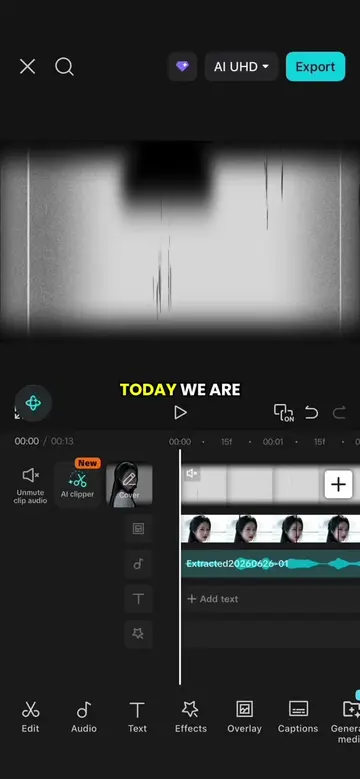
TODAY WE ARE
@peachedit83
13.0K followers · usually 76.2K views a post
Views
271.9K
Likes
27.7K
Comments
185
Shares
1.6K
Selling · SaaS › Other SaaS
Why it worked
The video provides a clear, step-by-step tutorial for a popular video editing effect, making it highly shareable and valuable for users looking to replicate trending styles.
Summary
This video demonstrates how to create a beat-synced video effect using CapCut. It involves adding music, marking beats, layering clips, applying masks and animations, and adding text.
Structure
- 1Add music and mark beats
- 2Layer and mask clips
- 3Add text and animation
- 4Import and layer additional clips
- 5Apply final animations
Product placement
CapCut: video editing software used to create the video. It ACTS. Removing it would change what happens in the video.
AI clipper: a feature within CapCut. It ACTS. Removing it would change what happens in the video.
On-screen text
TODAY WE ARE
GOING TO LEARN THIS
WE ARE GOING TO LEARN THIS
MUSIC,
THEN TAP BEAT
AND SELECT AUTO
NEXT, IMPORT A
BLACK BACKGROUND CLIP
AND ALIGN IT
BEAT.
STARTING FROM THE
SECOND BEAT AND
EXTEND IT TO THE
NINTH BEAT.
NOW SPLIT THE
CLIP AT THE
SIXTH BEAT.
DUPLICATE THE FIRST
SECTION FOUR TIMES,
UNDERNEATH.
THEN SHORTEN EACH
CLIP AND ALIGN
FOLLOWING BEAT MARKERS
JUST LIKE THIS.
CLIP,
TAP MASK, CHOOSE
THEN ADJUST THE
SETTINGS, ROTATE IT
TO 30 DEGREES
AND SCALE IT DOWN LIGHTLY.
FOR THE SECOND
SAME MIRROR MASK,
ROTATE IT TO 30 DEGREE, SCALE
IT DOWN A
AND MOVE IT
SLIGHTLY OVERLAPS THE
FIRST MASK.
REPEAT THE SAME
REMAINING CLIPS.
SET UP, ADD
ANIMATION TO EACH
ONE.
NEXT, SELECT THE
THE SPLIT CLIP
AND MAKE IT
THE MAIN TRACK.
ADD A KEYFRAME AT THE BEGINNING
AND THE END AND SLIGHTLY ENLARGE IT AT
THE ENDING KEYFRAME.
DUPLICATE THE CLIP,
AN OVERLAY AND
ALIGN IT WITH
THE MAIN TRACK.
CLIP, SELECT REMOVE
BACKGROUND
OVER THE SUBJECT.
JuJingYi
TEXT, CHOOSE A
STYLE,
FIT, THEN MOVE
BOTTOM LAYER.
ADD A SNOWLIGHT
BLUR ENTRANCE ANIMATION
AND EXTEND THE
ANIMATION DURATION TO
THE MAXIMUM.
NEXT, IMPORT THREE
THE MAIN TRACK.
ALIGN THE FIRST
TWO CLIPS TO
AND THE THIRD
BEATS.
DUPLICATE THE THIRD
THE COPY INTO
AN OVERLAY.
THE MAIN TRACK,
SELECT THE OVERLAY,
SELECT REMOVE BACKGROUND
AND REMOVE THE
SUBJECT AGAIN.
NOW IMPORT A
0.8 SECOND CLIP
AND ALIGN IT
TRACK.
TAP MASK, CHOOSE
RESIZE AND POSITION
IT TO THE
BOTTOM LAYER.
IMPORT ANOTHER 0.7
SECOND CLIP AND REPEAT
THE SAME STEPS USING A
RECTANGLE MASK.
RESIZE IT, POSITION
IT TO THE
BOTTOM LAYER.
REPEAT THE PROCESS
FOR THE REMAINING
REDUCING EACH ONE
BY 0.1 SECONDS.
IN TOTAL,
YOU'LL NEED FIVE MASKED
CLIPS.
FINALLY, ADD AN
EXPAND ANIMATION TO
ALL FOUR CLIPS
JUST LIKE THIS.
AND THAT'S THE
FINAL RESULT.
Original caption
Episode 11 | Mask beat sync Effect #CapCut #capcutpioneer #tiktoktips #edittutorial #capcuttutorial
More from @peachedit83
Their other posts in the index, biggest breakout first.