Loading video…
All breakouts
796Text-HeavyHow-To hookConsumer Apps
Hook
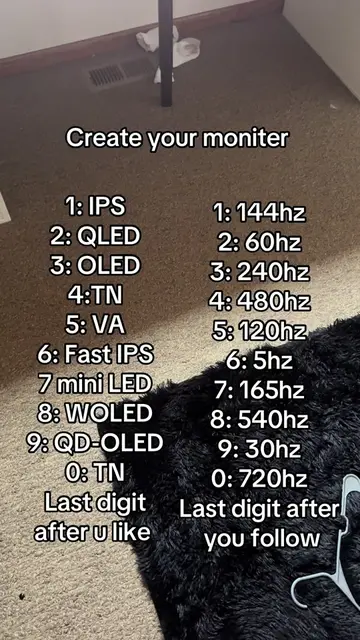
Create your moniter
@jdoestech11
9.1K followers · usually 652 views a post
Views
517.3K
Likes
22.5K
Comments
3.5K
Shares
185
Why it worked
This video likely performed well due to its interactive nature, encouraging user participation through a simple game mechanic. The topic of PC monitors and setups is also popular within the tech community on TikTok.
Summary
The video presents a "create your monitor" game where viewers choose monitor panel types and refresh rates based on the last digit of their like and follow actions. It displays lists of monitor panel types and corresponding refresh rates for viewers to select from.
Structure
- 1Introduce the "Create your monitor" game
- 2Display monitor panel options
- 3Display refresh rate options
- 4Instruct viewers on how to select their monitor based on the last digit of their like and follow
On-screen text
Create your moniter
1: IPS
2: QLED
3: OLED
4: TN
5: VA
6: Fast IPS
7 mini LED
8: WOLED
9: QD-OLED
0: TN
Last digit after u like
1: 144hz
2: 60hz
3: 240hz
4: 480hz
5: 120hz
6: 5hz
7: 165hz
8: 540hz
9: 30hz
0: 720hz
Last digit after you follow
Original caption
Comment what you got #techtok #setup #monitor #guide #pcsetups
More from @jdoestech11
More breakout videos from this creator.