Loading video…
Sound

original sound - melkiii04
Melki🎼🦷🎼 · Original audio
0:00–:––
- Videos using it
- 22
- Creators
- 2
- Views on those videos
- 5.6M
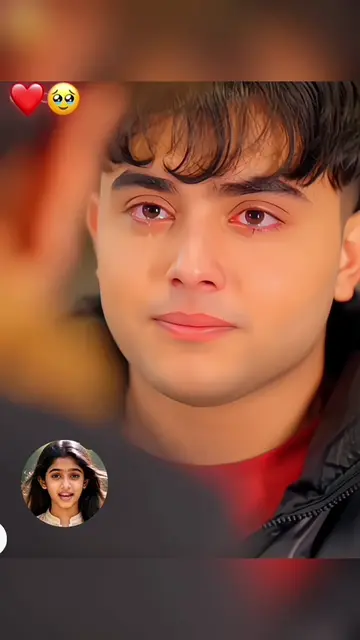
The video capitalizes on a trending AI filter, providing a clear, step-by-step tutorial using a popular editing app (CapCut). The 'soft sell' approach, where the product is integral to achieving the desired outcome without an overt advertisement, makes it highly effective and shareable.
This video demonstrates how to use the CapCut app to apply a trending AI crying filter effect to a personal photo. It guides viewers through copying a video link, selecting a template within CapCut, uploading their own photo, and finishing the process to achieve the effect.
Crying AI Filter Effect Tutorial 😭 crying ai filter effect tutorial crying ai filter viral crying ai filter capcut crying ai filter how to get crying ai filter crying ai filter trend crying ai effect tutorial crying effect Crying Face Al CapCut Filter crying capcut crying capcut template crying effect filter crying effect tutorial crying effect on tiktok crying effect tiktok crying effect sound crying effect video crying effect capcut crying effect challenge crying effect on capcut Crying effect utilisez cet effet capcut photo utilisez cet effet photo crying ai prompt video use template capcut yapay zeka crying ai prompt video capcut how to make cry ai videos #capcut #capcutpioneer
HOW TO USE
Introduce the trending AI crying filter effect.
Instruct to copy a video link and navigate to the creator's profile.
Guide to select the video and open it in CapCut.
Instruct to use the template by clicking the red and blue buttons.
Instruct to upload a photo to complete the effect.
Encourage viewers to try it themselves.
CapCut ACTS: it is used to apply an AI filter to a photo, producing a visible result (the crying filter effect). Removing it would change what happens in the video.
Give it a try.
Promotes 1 product. Create free account to see more.
Outliers and viral hits: their videos on Overshot, all time.
Video editing app for creators making social media videos
Views and creators: posted in the last 30 days (English videos). Videos: all time.