Loading video…
The creator

@l2ueducation
1.7K followers · 2.1K likes
Usual views
401
Outliers
11
Viral hits
0
Outliers and viral hits: their videos on Overshot, all time.
Hook
Posted Nov 5, 2026Video · 3:39by @l2ueducation
We didn’t find a product being promoted in this video. Its hook, format and structure below still show why it took off.
Browse products winning on TikTokThe video provides a highly actionable, low-barrier-to-entry tutorial that solves a universal, relatable pain point (managing receipts) using a clear, repeatable framework.
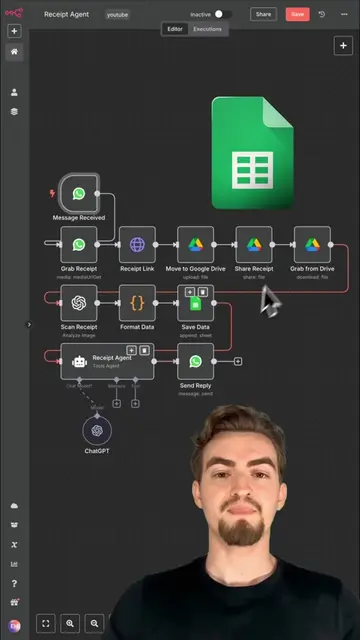
The creator provides a step-by-step tutorial on how to build a simple email automation using tools like Zapier, Make, or Power Automate. He demonstrates the process by creating a workflow that automatically saves email attachments to a folder and logs the details in a spreadsheet.
Seven steps to an automation that works while you sleep. Our example: every receipt or invoice that lands in your email gets saved to a Receipts folder and logged in a spreadsheet, automatically. One trigger, two actions, no code. 0:00 Intro 0:06 Step 1: Pick the right task 0:34 Step 2: Write it as one sentence 1:04 Step 3: Pick a tool 1:35 Step 4: Set the trigger 1:56 Step 5: Add the actions 2:24 Step 6: Test it for real 2:46 Step 7: Turn it on 3:06 Your homework The formula: "When this happens in this app, do that in that app." Your homework: build this one, or your own, using the same sentence. Test it once, then turn it on. Subscribe for new episodes: https://www.youtube.com/@L2UEducation?sub_confirmation=1 Follow on X: https://x.com/L2UEducation Tools named in this video (Zapier, Make, Microsoft Power Automate, Gmail, Google Drive, Outlook, Teams) are examples, not endorsements or sponsors. Free tiers, limits and features change; check them before you build. Time savings are an example. This video was made with AI tools: an AI avatar and a cloned voice of the host, plus AI-generated music. Education only. #AI #Automation #NoCode
Outliers and viral hits: their videos on Overshot, all time.
This week, you'll build an automation that works while you sleep. No code.
Define the automation task
Formulate the automation logic
Select an automation tool
Configure the trigger
Add the actions
Test and activate the automation
(a) Zapier ACTS: its interface is shown as a tool to build the automation. (a) Make ACTS: its interface is shown as a tool to build the automation. (a) Microsoft Power Automate ACTS: its interface is shown as a tool to build the automation. (b) Gmail APPEARS: used as the email service in the example. (b) Google Drive APPEARS: used as the cloud storage service in the example. (b) Google Sheets APPEARS: used as the spreadsheet service in the example. (b) Outlook APPEARS: used as the email service in the example. (b) Microsoft Teams APPEARS: used as the collaboration service in the example.
Build one automation this week. SUBSCRIBE FOR THE NEXT EPISODE

Playing this video’s own audio, so you’ll hear the creator over the sound.