Loading video…
All breakouts
234Text-HeavyHow-To hookCreator Economy
Hook
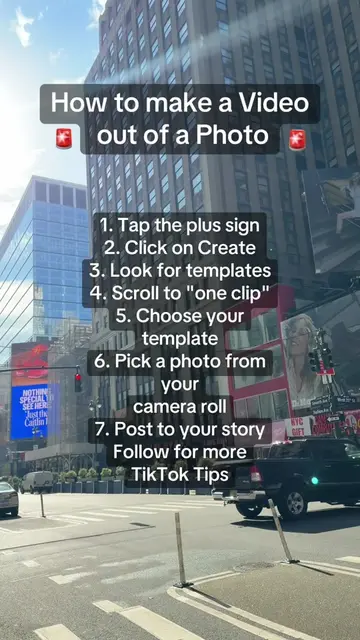
How To Make A Video Out Of A Photo
@davito_creatorgrowth
11.4K followers · usually 1.7K views a post
Views
391.1K
Likes
1.8K
Comments
60
Shares
207
Why it worked
The video provides immediate, actionable value by solving a common user question with a clear, numbered list that is easy to follow while watching.
Summary
A text-overlay tutorial demonstrates how to use the 'one clip' template feature within the TikTok app to create a video from a single photo. The video provides a step-by-step guide for users to follow.
Structure
- 1Identify the goal of creating a video from a photo
- 2List the seven steps to access the template feature
- 3Provide a call to action for more tips
Product placement
TikTok: The platform is operated to demonstrate a specific feature (templates/one clip). It ACTS as the environment and tool for the tutorial. Removing it would make the video impossible as the tutorial is specific to its interface.
Call to action
Follow for more TikTok tips!
On-screen text
How To Make A Video Out Of A Photo
1. Tap the plus sign
2. Click on create
3. Look for templates
4. Scroll to "one clip"
5. Choose your template
6. Pick a photo from your camera roll
7. Post to your story
Follow for more TikTok tips!
Original caption
How To Create A Video Using One Photo 1. Tap the plus sign 2. Click on create 3. Scroll through templates 4. Scroll right to "one clip" 5. Choose your template 6. Pick a photo from your camera roll 7. Post to your story ! Follow for more TikTok tips! #TikTokTips #TikTokTutorial #oneclip #tiktokfeatures
More from @davito_creatorgrowth
More breakout videos from this creator.