Loading video…
Sound

original sound - 01net.com
01net · Original audio
0:00–:––
Playing this video’s own audio, so you’ll hear the creator over the sound.
This video promotes it, but we haven’t matched it to a product page yet, so there are no product figures.
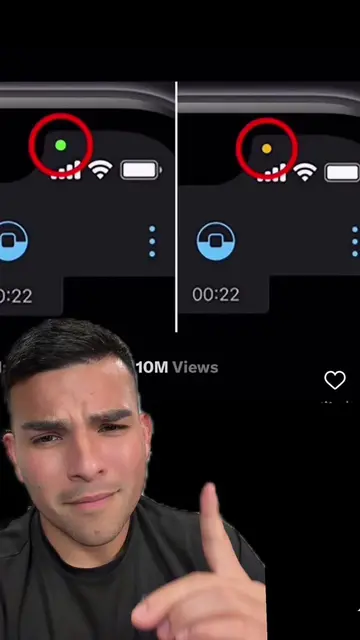
The video addresses a common user concern about privacy on their devices by explaining the meaning of the indicator dots and providing actionable steps to manage app permissions, making it highly relevant and informative.
This video explains the meaning of the colored dots that appear on an iPhone screen, indicating camera, microphone, or location usage. It advises viewers to check their privacy settings to ensure no unauthorized apps are accessing these features.
Si un point vert apparaît sur votre #iPhone… ne l’ignorez surtout pas ! #Apple #security
Si un point vert apparaît sur votre iPhone,
Introduction to the green dot on iPhone
Explanation of the green dot's purpose (privacy)
When the green dot indicates camera usage
How to check which app is using the camera
Explanation of orange and blue dots (microphone and location)
Conclusion on privacy indicators
The video discusses the green, orange, and blue indicator dots on iPhones, which signify camera, microphone, and location usage respectively. It shows the iPhone interface and settings related to these privacy features.
Vérifiez pourquoi.
Playing this video’s own audio, so you’ll hear the creator over the sound.
Promotes 7 products. Create free account to see more.
Outliers and viral hits: their videos on Overshot, all time.