The video provides high-value technical education while demonstrating the utility of an AI tool in a real-world workflow, making the product feel indispensable rather than just advertised.
Summary
The creator demonstrates how to use Claude to generate infrastructure-as-code for AWS system designs. He walks through three examples: a user login system, an automated email marketing service, and an image processing service.
Structure
1Introduction to system design for developers
2Using Claude to generate infrastructure code
3Example 1: Building a user login system
4Example 2: Building an email marketing service with a queue
5Example 3: Building an image processing service with S3
6Conclusion on building with AWS and AI
Product placement
Original caption
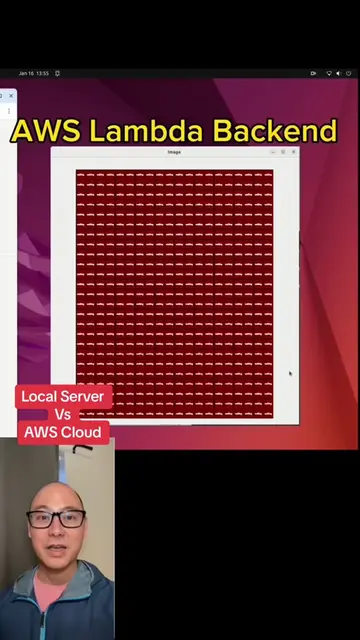
System design for vibe coders 🚀 Here's everything you need to build real-world AWS systems with AI: ⚡ AWS Lambda — where your backend code lives & scales automatically 🔀 API Gateway — handles routing & security between frontend & backend 🗄️ DynamoDB — super fast NoSQL database (think: Excel sheet on steroids) 📦 S3 — file storage bucket for images & any type of file 📬 SQS Queue — like a coffee shop line, processes tasks one by one 📅 EventBridge — schedule tasks (e.g. send emails at 1AM every day) 📧 Simple Email Service (SES) — send emails at scale We build 3 real-world examples: 1️⃣ Login system with email verification 2️⃣ Scheduled email marketing service 3️⃣ ML-powered cartunify image service And AI writes ALL the infrastructure code for you using AWS CDK 🤯 #AWS #SystemDesign #VibeCoding #LearnToCode #CloudComputing #Lambda #DynamoDB #SoftwareEngineering #AITools #BackendDevelopment
More from @codingai
Their other posts in the index, biggest breakout first.
Claude is used throughout the video to generate AWS CDK code for system architecture.
On-screen text
System Design For Vibecoders
Welcome back Eric!
Tips for getting started
Run /init to create a CLAUDE.md file with instructions
Recent activity
2w ago Look at files in this folder and determine the organization
/desktop/for_fun
Welcome back Eric!
Tips for getting started
Run /init to create a CLAUDE.md file with instructions
Recent activity
2w ago Look at files in this folder and determine the organization
/desktop/for_fun
Welcome back
Sign in to your account
Email address
Password
Sign In
Forgot password?
Continue with Google
Don't have an account? Sign up
BRAND NAME
30% OFF
Spring Sale is Here!
Refresh your wardrobe with our stunning new collection. For a
limited time, enjoy 30% off all items. Don't miss out!
Shop Now
Use code at checkout:
SPRING30
Image created
blonde woman in café diptych
Welcome to the weekend, Eric
Write this code in AWS CDK.
API gateway connects to Lambda. Lambda needs to access a user table, Dynamo DB
table. Lambda needs to send emails via Simple Email Service.
Sonnet 4.5
Want to be notified when Claude responds?
Notify
I'll write AWS CDK code to create an API Gateway connected to a Lambda function that can
access DynamoDB and send emails via SES.
Creating AWS CDK stack with API Gateway, Lambda, DynamoDB, and SES permissions
What's Included
Api stack
TS
Download
Index
TS
Download
App
TS
Download
Package
Code JSON
Download
Readme
Document MD
Download
Download all
Want to be notified when Claude responds?
Notify
Api stack
TS
Download
Index
TS
Download
App
TS
Download
Package
Code JSON
Download
Readme
Document MD
Download
Download all
Want to be notified when Claude responds?
Notify
Quick Start:
bash
npm install
cdk bootstrap # First time only
npm run build
cdk depl
EventBridge cron event (1:00am everyday PST), triggers lambda1, with access to dynamodb user table
lambda1 writes to SQS.
lambda2 consumes SQS. Lambda2 accesses Simple Email Service.
I want AWS CDK code for the following
Event Bridge Cron event (1:00am everyday PST), triggers lambda1, with access to dynamodb user table
lambda1 writes to SQS.
lambda2 consumes SQS. Lambda2 accesses Simple Email Service.
I'll create a CDK stack in TypeScript for this architecture.
Reading 1 file. (ctrl+c to expand)
ls /home/ericyim/Desktop/for_fun/test.
whisking. (thought for 6s)
esc to interrupt
Do you want to create Stack.ts?
1. Yes
2. No
3. No
I want to allow all edits during this session (shift+tab)
esc to interrupt
Want to be notified when Claude responds?
Notify
Transcript
system design for vibe coders. I wanna teach vibe coders how to build real world systems. But we can't learn without visuals. So I asked Claude. It recommends some software that we can use and it individually makes the components that I want to teach because that's the world we live in. You imagine a tool you need for teaching and suddenly AI has built it. In this video we'll do three real world services. We'll do a login, we'll do an emailing service, and we'll do a machine learning cartoonify image service. In this video we learn the core AWS components and how to set them up with AI so that you can build practically anything. Let's first do a website with a login. A user goes to your website. This is called the client or the front end. Now on the backend you need something that can handle scalable traffic. So as more traffic comes in, a lot of users, then you're also gonna have a lot of backend computers working for you. And this AWS Lambda does that. So whenever you think where do I put my code, the code goes into the Lambda. Right? Front end client, back end Lambda. We could connect these two directly, but that's not actually done in practice. Whenever we have an API, we can put API Gateway in between and that handles routing and security. Now we're building a login, remember? So we need to store information about our users somewhere. We need a table. And look how the AI drew this table. It kind of looks like an Excel sheet and that's a good way to visualize what a table is. I personally think DynamoDB is the best product that AWS has. It's super fast and easy to use. Now what about for your login, if you needed to have email verification, then there exists AWS components like this simple email service. So you just connect that to your Lambda. Your Lambda can run the logic of what to send. Now look at all these components, right? These are all the AWS components that we need to set up our login and we can have AI set this up for us. It's called infrastructure as code and this infrastructure the AI can write. So you tell your AI I wanna use AWS CDK, that's part you need to remember, CDK, and I wanna have a Lambda behind a API Gateway. The Lambda should have access to a DynamoDB table and an email service. That's it. And go. Now you can see how it's making all the files and it even tells you how to run it at the end. Example number two. Let's say you wanted to build an email marketer, so you need to send out emails to a bunch of users at a certain schedule. Well what users are we gonna send those emails to? We start with a DynamoDB table. It's our user table. Oh, what's a DynamoDB? It's like an Excel sheet that's super fast, remember? Now our user table, let's connect that to a Lambda, right? The scalable processing. That's where all the logic goes. And if we're doing this on a schedule, we can use something called EventBridge. So imagine you wanna send it at 1 AM every day. And then we connect that with Lambda again to the email service. But now we have a problem. What if we have to send thousands of emails at the same time? Our email service, let's say it can only send out a hundred at a time. How are we going to send a thousand? What we can do is set up a queue. This is like people waiting in line at the coffee shop. The first bunch will be sent right at 1 AM and we'll process over time as our email service is ready. Now again, look at all the components for our emailer service and now let's build that with cloud code instead of cloud in the browser. I'll show you it's much, much easier. So you tell it I have these two Lambdas, remember that's where your code goes. Then the first Lambda is connected to the user table, DynamoDB and the EventBridge. Then that Lambda writes to a queue. That queue is consumed by the second Lambda which does the emailing and in cloud code it's gonna write those files actually to your computer. You can open the files and look at them and you can run the commands to set this up in your AWS account. There's one more very core AWS component that you need to know about. So let's do a third example. Let's make this cartoonify image service. Remember a few years ago when people used to submit their pictures? Let's build that. So user goes to their computer, that's the front end and we wanna submit a photo. So we need to have a back end API Gateway and Lambda. That's our back end. Front end says to the back end, I wanna upload this image. That image has to go somewhere. Where is it gonna go? Before we use DynamoDB, super fast Excel, but that doesn't work here. There's another type of storage called S3. It just looks like a bucket where we can throw any type of file in there. Now you can hook this up to Lambda. Anytime a file appears in your bucket, I wanna process it. Anytime an image goes into here, we wanna run that through a machine learning model. Let's say that our machine learning model can live in this Lambda. What about if we get too many images at once? What do we do? We gotta throw in that queue. Everybody lines up for coffee. After the image goes through the machine learning model, you'll have another image. You need to put that somewhere. Where do you put it? Into another bucket. The front end will call the back end and say, where do I get the output image? Then it will get the location and you can download that image from the S3 bucket. That's it. Three real world examples, how to use AWS. Now you can build anything.