Loading video…
All breakouts
380Text-HeavyOther hookAI Tools
Hook
✨ Follow @sambit.ai.tech
@sambit.ai.tech
5.4K followers · usually 687 views a post
Views
256.6K
Likes
6.3K
Comments
33
Shares
1.2K
Why it worked
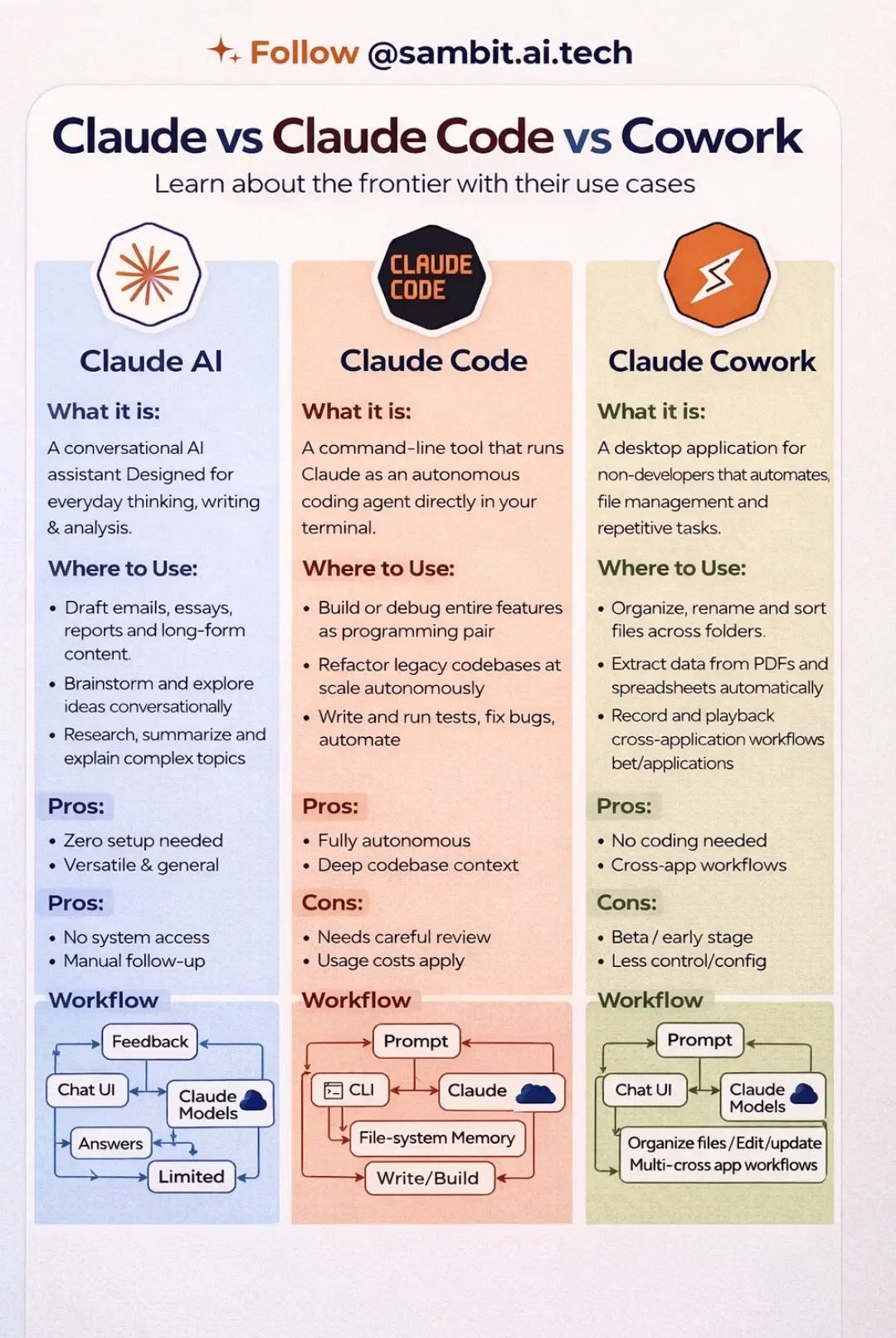
The post provides a clear, structured comparison of different AI tools, addressing a common point of confusion for users and offering valuable insights into their distinct functionalities and applications.
Summary
This post compares three different products from Claude: Claude AI, Claude Code, and Claude Cowork. It outlines what each product is, where to use it, its pros and cons, and its workflow.
Structure
- 1Introduction and title slide
- 2Comparison of Claude AI
- 3Comparison of Claude Code
- 4Comparison of Claude Cowork
Original caption
Most people using Claude don’t realize there are 3 completely different ways to use it. When people hear Claude, they usually think it’s just another AI chatbot. But Claude actually has three different products, each designed for a very different use case. Here’s the simple breakdown 👇 1️⃣ Claude AI Your everyday AI assistant. Use it for: • writing and research • brainstorming ideas • summarizing complex information • long-form thinking and analysis Great for professionals, students, and creators. ⸻ 2️⃣ Claude Code This is where things get powerful. Claude Code runs inside your terminal and acts like an AI coding agent. You can use it to: • build features faster • debug code • refactor large codebases • automate development workflows This is becoming a powerful tool for developers building with AI. ⸻ 3️⃣ Claude Cowork Designed for non-developers. It helps automate repetitive tasks like: • organizing files • extracting data from PDFs • managing workflows across apps Think of it as AI automation for everyday work. ⸻ The biggest opportunity with AI right now isn’t just chatting with it. It’s learning how to use the right AI tool for the right job. That’s how people are: • increasing productivity • building AI tools • creating automation workflows • exploring AI side hustles If you’re learning AI tools or automation, this is worth understanding. Send this to someone exploring AI productivity or AI tools. Which one would you use most: Claude AI, Claude Code, or Claude Cowork? Follow @sambit.ai.tech for practical AI tools, workflows, and AI opportunities. Save this for later. #claude #aiforbeginners #ai
More from @sambit.ai.tech
More breakout videos from this creator.