Loading video…
Sound

original sound - sambit.ai.tech
Sambit | AI & Tech · Original audio
0:00–:––
Playing this video’s own audio, so you’ll hear the creator over the sound.
The video provides a practical and actionable workflow for a common problem faced by users of AI tools: managing usage limits. By breaking down the process into clear steps and demonstrating how to leverage different tools effectively, it offers significant value to the audience.
This video explains a workflow to use Fable 5 for AI projects without exceeding usage limits. It involves using Fable 5 for initial brainstorming and research, then converting ideas into tickets in Linear, and finally using Fable 5 as an orchestrator for execution via Opus 4.8 subagents.
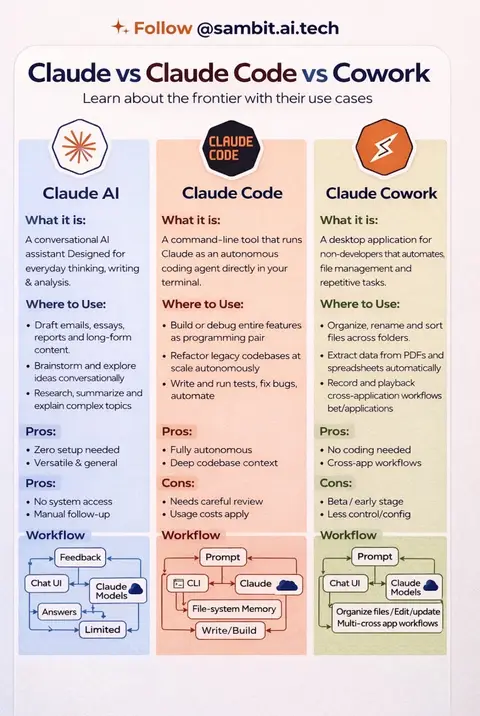
Fable 5 is powerful—but using it for every coding task can burn through your Claude usage fast. Here’s a smarter Claude Code workflow: 1️⃣ Use Claude Sonnet 5 to brainstorm, research, clarify requirements, and define the project. 2️⃣ Connect Linear through MCP and convert the plan into tickets with dependencies, blockers, and human/agent ownership. 3️⃣ Import those tickets into a dedicated Fable 5 Claude Code project. 4️⃣ Let Fable 5 orchestrate the architecture and execution plan, while Opus 4.8 subagents handle focused implementation tasks. The idea: use your most capable model for high-level reasoning and orchestration—not every line of code. Fable plans. Opus builds. Save this Claude Code workflow and follow @sambit.ai.tech for practical AI engineering tutorials. Claude Fable 5, Claude Sonnet 5, Claude Code, Opus 4.8, MCP server, Linear MCP, AI coding agents, subagents, agentic coding, Claude workflow, AI software development #ClaudeCode #Fable5 #AICoding #AIAgents #aiengineering
How to use Fable 5 without hitting Usage Limit
Introduction to the problem and solution
Step 1: Brainstorming and research with Fable 5
Step 2: Converting ideas to tickets in Linear
Step 3: Importing tickets into Fable 5 for project planning
Step 4: Using Opus 4.8 subagents for execution
Conclusion: The hack to save usage
Fable 5 is shown as the primary tool for brainstorming, research, and project orchestration. Linear is mentioned as a tool for ticket management. Opus 4.8 subagents are presented as execution agents.
Follow for more AI automations using Claude.
Playing this video’s own audio, so you’ll hear the creator over the sound.
Promotes 2 products. Create free account to see more.
Outliers and viral hits: their videos on Overshot, all time.
AI language model for generating text in Claude
All time.