Loading video…
All breakouts
4.8Text-HeavyListicle hookAI Tools
Hook
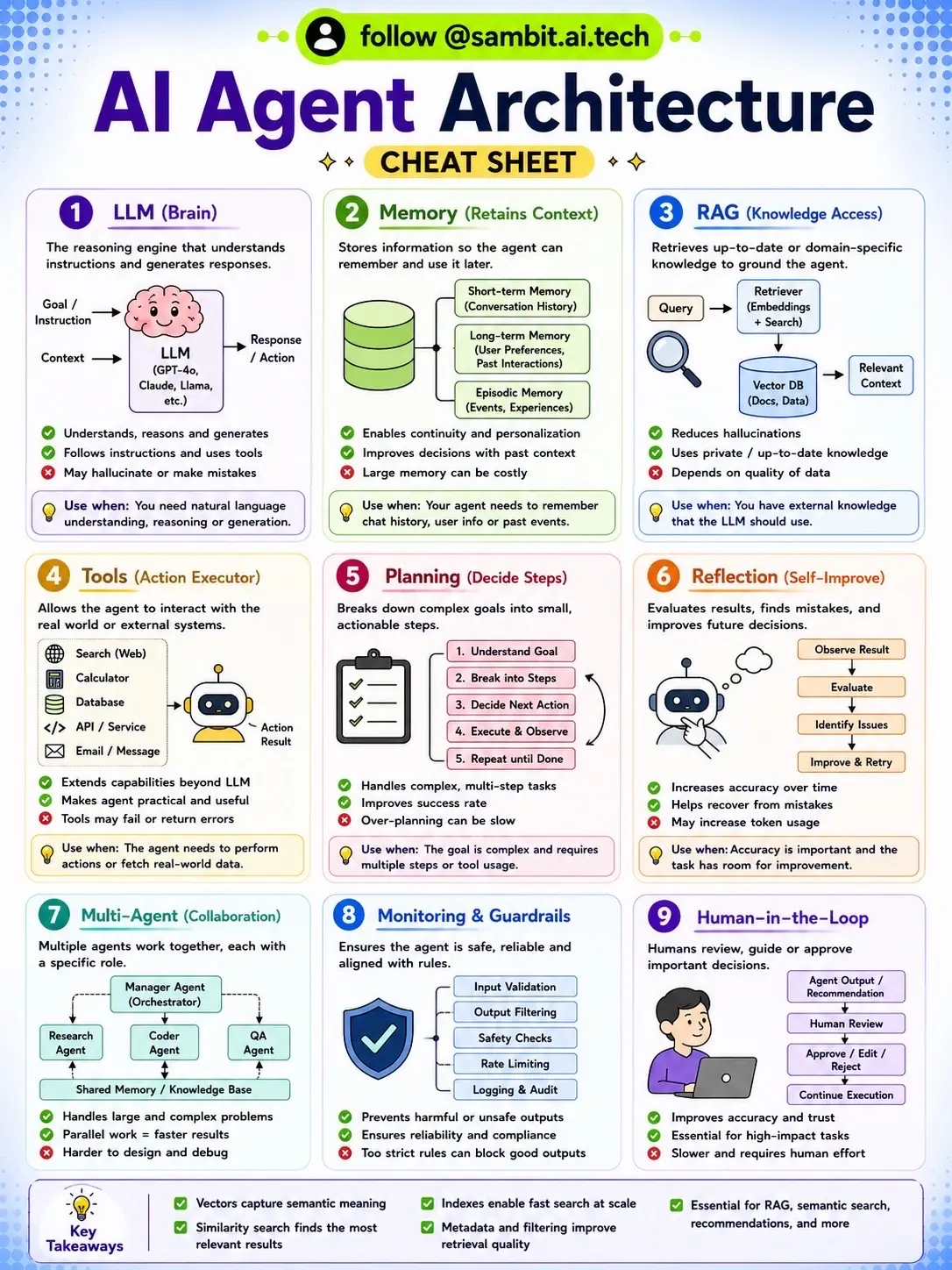
AI Agent Architecture CHEAT SHEET
@sambit.ai.tech
5.4K followers · usually 687 views a post
Views
3.3K
Likes
107
Comments
1
Shares
34
Why it worked
The post provides a highly valuable and visually organized cheat sheet on a complex AI topic, making it easily digestible and shareable. The clear breakdown of components and their functions caters to engineers and enthusiasts looking to understand AI agent architecture.
Summary
This TikTok post presents a comprehensive cheat sheet on AI Agent Architecture, breaking down the key components like LLM, Memory, RAG, Tools, Planning, Reflection, Multi-Agent Collaboration, Monitoring & Guardrails, and Human-in-the-Loop. It aims to educate viewers on building production-ready AI agents by explaining the function and use cases of each element.
Structure
- 1Introduction to AI Agent Architecture
- 2Explanation of LLM (Brain)
- 3Details on Memory and RAG
- 4Description of Tools and Planning
- 5Discussion of Reflection and Collaboration
- 6Overview of Monitoring and Human-in-the-Loop
- 7Key takeaways and call to action
Call to action
Save this post for later
On-screen text
AI Agent Architecture
CHEAT SHEET
1 LLM (Brain)
The reasoning engine that understands instructions and generates responses.
Instructions
Context
Response / Action
LLM
(e.g. GPT-4, Claude, Llama, etc.)
✓ Understands, reasons and generates
✓ Follows instructions and uses tools
✓ May hallucinate or make mistakes
Use when you need natural language understanding, reasoning or generation.
2 Memory (Retains Context)
Stores information so the agent can remember and use it later.
Short-term Memory
(Conversation History)
Long-term Memory
(User Preferences, Past Interactions)
Episodic Memory
(Events, Experiences)
✓ Enables continuity and personalization
✓ Improves decisions with past context
✓ Large memory can be costly
Use when your agent needs to remember chat history, user info or past events.
3 RAG (Knowledge Access)
Retrieves up-to-date or domain-specific knowledge to ground the agent.
Query
Vector DB
(Docs, Data)
Embeddings
+ Search
Relevant Context
✓ Reduces hallucinations
✓ Enables private, up-to-date knowledge
✓ Depends on quality of data
Use when LLM has external knowledge that the LLM should use.
4 Tools (Action Executor)
Allows the agent to interact with
real world or external systems.
Search (Web)
Calculator
Database
API / Service
Email / Message
Action
Result
✓ Extends capabilities beyond LLM
✓ Makes agent practical and useful
✓ Tools may fail or return errors
Use when the agent needs to perform
actions or fetch real-world data.
5 Planning (Decide Steps)
Breaks down complex goals into small,
actionable steps.
1. Understand Goal
2. Break into Steps
3. Decide Next Action
4. Execute & Observe
5. Repeat until Done
✓ Handles complex, multi-step tasks
✓ Improves success rate
✓ Over-planning can be slow
Use when the goal is complex and requires
multiple steps or tool usage.
6 Reflection (Self-Improve)
Evaluates results, finds mistakes, and
improves future decisions.
Observe Output
Evaluate
Identify Issues
Improve & Retry
✓ Increases accuracy over time
✓ Helps recover from mistakes
✓ May increase token usage
Use when: Accuracy is important and the
task looks for improvement.
7 Multi-Agent Collaboration
Monitors agents working together, each with
a specific role.
Manager Agent
(Orchestrator)
Research
Agent
QA
Agent
Coder
Agent
Shared Memory / Knowledge Base
✓ Parallel work = faster results
✓ Fewer agents = harder to design and debug
8 Monitoring & Guardrails
Ensures the agent is safe, reliable and
aligned with your rules.
Input Validation
Output Filtering
Safety Checks
Rate Limiting
Logging & Audit
✓ Prevents harmful or unsafe outputs
✓ Ensures reliability and safety
✓ Too strict rules can block good outputs
9 Human-in-the-Loop
Reviews, guides or approve
important decisions.
Human Output /
Recommendation
Approve / Edit /
Reject
Continue Execution
✓ Improves accuracy and trust
✓ Essential for hard or repetitive tasks
✓ Slower and requires human effort
Key
Takeaways
✓ Similarity search finds the most
relevant results
✓ Indexes enable fast search at scale
✓ Essential for RAG, semantic search,
recommendations, and more
✓ Indexes enable fast search at scale
✓ Metadata and filtering improve
retrieval quality
Original caption
If you want to build AI Agents, understand this architecture first. 🤖 A production-ready AI Agent is more than an LLM. It combines memory, RAG, tools, planning, reflection, multi-agent systems, guardrails, and human-in-the-loop workflows. 💾 Save this AI Agent architecture cheat sheet. 👇 Follow @sambit.ai.tech for practical AI engineering and system design. AI Agents • Agentic AI • AI Agent Architecture • LLM • RAG • MCP • Tool Calling • Multi-Agent Systems • AI Engineering #AIEngineer #AIAgents #AgenticAI #GenerativeAI #softwareengineer
More from @sambit.ai.tech
More breakout videos from this creator.