Loading video…
All breakouts
7.8Text-HeavyListicle hookAI Tools
Hook
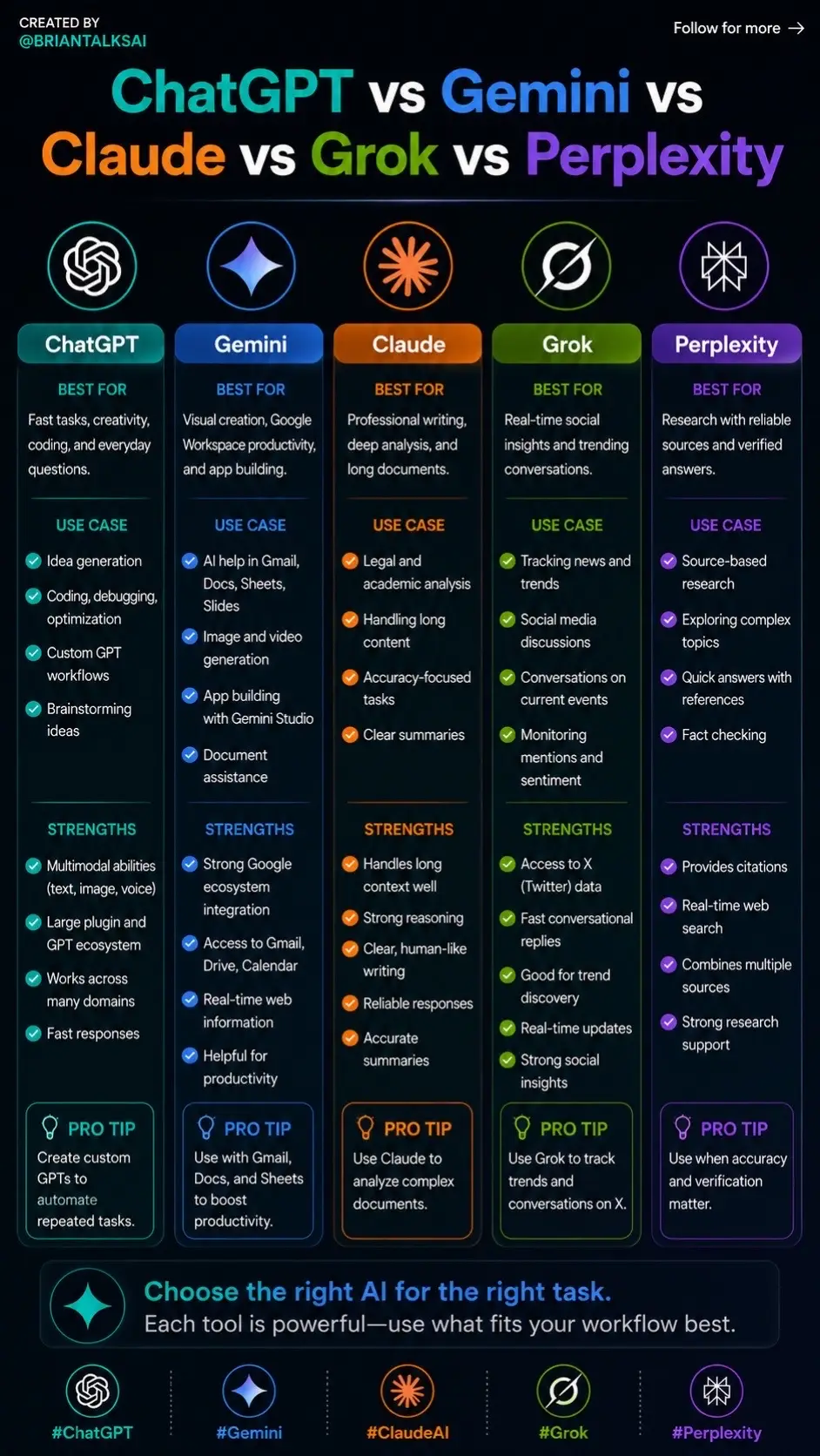
ChatGPT vs Gemini vs Claude vs Grok vs Perplexity
@briantalksai
10.6K followers · usually 837 views a post
Views
6.1K
Likes
137
Comments
2
Shares
32
Why it worked
The post provides a clear, concise, and visually appealing comparison of popular AI tools, addressing a common user pain point: choosing the right tool for the job. The structured format with use cases, strengths, and pro tips makes it highly shareable and valuable for users looking to optimize their AI usage.
Summary
This post compares five popular AI tools: ChatGPT, Gemini, Claude, Grok, and Perplexity, detailing their best use cases, strengths, and offering pro tips for each. It aims to guide users in choosing the right AI for their specific workflow needs.
Structure
- 1Introduction of AI tools comparison
- 2Detailed breakdown of ChatGPT, Gemini, Claude, Grok, and Perplexity (use cases, strengths, pro tips)
- 3Guidance on choosing the right AI for the right task
- 4Visual representation of each AI tool with hashtags
Product placement
The post compares and contrasts five AI tools: ChatGPT, Gemini, Claude, Grok, and Perplexity, detailing their respective strengths and use cases. No specific product is being sold, but the content serves to educate users on the different capabilities of these AI tools.
Call to action
Save this. You’ll need it.
On-screen text
CREATED BY
@BRIANTALKSAI
ChatGPT vs Gemini vs
Claude vs Grok vs Perplexity
ChatGPT
BEST FOR
Fast tasks, creativity,
coding, and everyday
questions.
USE CASE
Idea generation
Coding, debugging,
optimization
Custom GPT
workflows
Brainstorming
ideas
STRENGTHS
Multimodal abilities
(text, image, voice)
Large plugin and
GPT ecosystem
Works across
many domains
Fast responses
PRO TIP
Create custom
GPTs to
automate
repeated tasks.
#ChatGPT
Gemini
BEST FOR
Visual creation, Google
Workspace productivity,
and app building.
USE CASE
AI help in Gmail,
Docs, Sheets,
Slides
Image and video
generation
App building
with Gemini Studio
Document
assistance
STRENGTHS
Strong Google
ecosystem
integration
Access to Gmail,
Drive, Calendar
Real-time web
information
Helpful for
productivity
PRO TIP
Use Gmail,
Docs, and Sheets
to boost
productivity.
#Gemini
Claude
BEST FOR
Professional writing,
deep analysis, and
long documents.
USE CASE
Legal and
academic analysis
Handling long
content
Accuracy-focused
tasks
Clear summaries
STRENGTHS
Handles long
context well
Strong reasoning
Clear, human-like
writing
Reliable responses
Accurate
summaries
PRO TIP
Use Claude to
analyze complex
documents.
#ClaudeAI
Grok
BEST FOR
Real-time social
insights and trending
conversations.
USE CASE
Tracking news and
trends
Social media
discussions
Conversations on
current events
Monitoring
mentions and
sentiment
STRENGTHS
Access to X
(Twitter) data
Fast conversational
replies
Good for trend
discovery
Real-time updates
Strong social
insights
PRO TIP
Use Grok to track
trends and
conversations on X.
#Grok
Perplexity
BEST FOR
Research with reliable
sources and verified
answers.
USE CASE
Source-based
research
Exploring complex
topics
Quick answers with
references
Fact checking
STRENGTHS
Provides citations
Real-time web
search
Combines multiple
sources
Strong research
support
PRO TIP
Use when accuracy
and verification
matter.
#Perplexity
Choose the right AI for the right task.
Each tool is powerful—use what fits your workflow best.
Original caption
Most people are using AI wrong. They pick one tool… and force it to do everything. That’s why they stay average. Here’s the truth: each AI has a specific edge. Use the right one = unfair advantage. Save this. You’ll need it. #ChatGPT #Gemini #ClaudeAI #Grok #Perplexity
More from @briantalksai
More breakout videos from this creator.