On-screen text
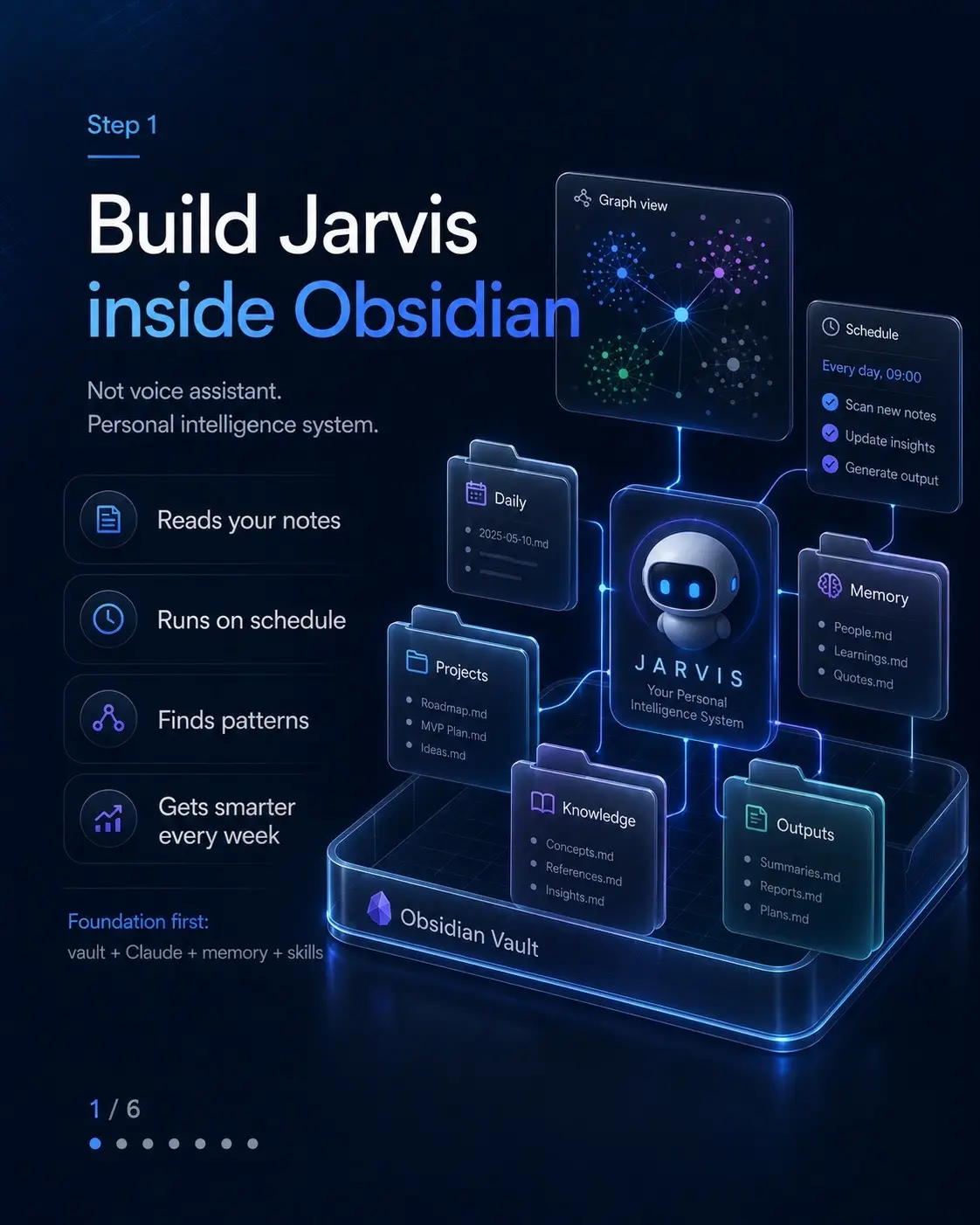
Step 1
Build Jarvis
inside Obsidian
Not voice assistant.
Personal intelligence system.
Reads your notes
Runs on schedule
Finds patterns
Gets smarter
every week
Foundation first:
vault + claude + memory + skills
Step 2
This is not
a voice
assistant
It runs in background
of your life.
Typical assistant
Waits for prompt
Answers question
Easy to forget
Jarvis system
Reads notes automatically
Tracks projects and decisions
Surfaces patterns and open loops
Improves every week
From chat tool to background intelligence layer
Step 3
Week 1 -> Week 12
Useful becomes indispensable.
1
Week 1
Morning brief beats
manual project recap.
2
Week 4
It connects last
month's decision to
today's problem.
3
Week 12
It identifies work
pattern hiding for
3 months.
Compounding context changes output quality.
Step 4
Passive vault vs active vault
Same notes. Different behavior.
Passive
You write notes
Notes sit there
You search later
Maybe you find something
Active
Reads notes automatically
Generates outputs on schedule
Surfaces missed connections
Applies what it learned last week
Schedule
Every day, 09:00
Scan new notes
Update insights
Generate output
Morning brief
3 new connections
2 follow-ups
1 idea to explore
Difference is not storage. Difference is execution.
Step 5
Core system
architecture
Connection + automation + memory.
This is what turns notes into an active system.
Not plugin stack. Operating loop.
Step 6
Why it
gets smarter
Three compounding mechanisms
1
Accumulated
memory
Every run writes
context to
persistent memory.
2
Skill refinement
You improve weak
outputs and future
runs inherit the fix.
3
Pattern recognition
Months of notes
reveal themes you
cannot see manually.
Each run leaves residue. Residue improves next run.
Step 7
Foundation
stack
Install core tools first.
Claude Desktop
Your AI brain and executor
Node.js
Runtime environment
Obsidian
Knowledge hub
Filesystem MCP
File operations & access
Hermes Agent
Orchestration layer
SQLite memory
Long-term memory store
Telegram notifications
Alerts and updates (optional)
vault + connection + automation + memory
Step 8
Create vault structure
One vault. Clear routing.
JARVIS-VAULT/
00-INBOX/
01-KNOWLEDGE/
02-PROJECTS/
03-DAILY/
04-JARVIS-OUTPUTS/
briefings/
connections/
patterns/
syntheses/
reviews/
05-RESOURCES/
06-ARCHIVE/
07-SYSTEM/
CLAUDE.md
memory/
Outputs + system live inside same vault.
Step 9
Connect Claude
to your vault
Use Filesystem MCP.
Claude Desktop
MCP configuration
Config file path
--/Library/Application Support/claude_desktop_config.json
Configuration
{
"mcpservers": {
"jarvis-vault": {
"command": "npx",
"args": [
"@modelcontextprotocol/server-filesystem",
"-y",
"/Users/yourname/JARVIS-VAULT"
]
}
}
}
Test: "List all folders in my vault and describe what you see."
If Claude sees folder structure, connection is live.
Step 10
Add automation layer
Install Hermes Agent.
> Install Hermes Agent
1 git clone https://github.com/NousResearch/hermes-agent
2 cd hermes-agent
3 npm install
Scheduler
Runs skills on
a schedule.
Cron + Natural
Retries
Handles failures
with backoff.
3 attempts
HERMES
Agent
Memory
Provides context
across runs.
Persistent store
Outputs
Delivers structured
results.
Summaries + Reports
Telegram
Sends updates
where you are.
Bot notifications
Hermes runs skills on schedule.
Step 11
Configure .env
Put memory inside vault.
.env
MODEL
MODEL_PROVIDER=anthropic
MODEL_NAME=claude-opus-4-8
ANTHROPIC_API_KEY=your-api-key
MEMORY
MEMORY_BACKEND=sqlite
MEMORY_PATH=/Users/yourname/JARVIS-VAULT/07-SYSTEM/memory/jarvis.db
SCHEDULER & OUTPUTS
ENABLE_SCHEDULER=true
SCHEDULER_TIMEZONE=America/New_York
OUTPUT_PATH=/Users/yourname/JARVIS-VAULT/04-JARVIS-OUTPUTS
SKILLS
SKILL_RETRY_ENABLED=true
SKILL_RETRY_MAX=3
SKILL_RETRY_DELAY=300
NOTIFICATIONS
NOTIFICATION_GATEWAY=telegram
TELEGRAM_BOT_TOKEN=your-bot-token
TELEGRAM_CHAT_ID=your-chat-id
Memory backs up with vault.
Step 12
Write CLAUDE.md
This makes Jarvis personal.
CLAUDE.md
# CLAUDE.md
## 1. Identity
## 2. How I actually work
## 3. Focus areas
## 4. Active projects
## 5. Current beliefs
## 6. Active questions
## 7. Output standards
## 8. Permissions
## 9. Memory rules
## 10. Update protocol
Every skill reads this first.
1. Identity
Who Jarvis is,
who you are.
2. How I actually work
Your workflow,
rhythm, patterns.
3. Focus areas
What matters
most right now.
4. Active projects
Live projects
and context.
5. Current beliefs
Principles that
guide decisions.
6. Active questions
Open questions
you're exploring.
7. Output standards
Tone, depth,
quality bar.
8. Permissions
What Jarvis can
do (and ask).
9. Memory rules
What to remember,
what to forget.
10. Update protocol
When and how
to evolve this file.
Best outputs start with best operating doc.
Step 13
What goes inside
CLAUDE.md
Give Jarvis real operating context.
Identity
Name
Role
Timezone
Work style
Best hours
Derailers
Energizing tasks
Focus areas
Top priorities
Core goals
Boundaries
Active projects
Status
Next action
Priority
Beliefs
Principles
How you decide
What matters
Questions
Open items
Decisions needed
Unknowns
Decisions
Recent calls
Rationale
Notes
Output standards
Tone & voice
Format
Quality bar
Permissions
What I can do
What to avoid
Escalate when
Write how you actually work. Not idealized version.
Step 14
Set boundaries
and permissions
Autonomy works best with clear rules.
Jarvis can do
Read any file in vault
Write to 04-JARVIS-OUTPUTS
Search relevant external info
Update memory database
Requires approval
Write outside outputs folder
Contact external parties
Financial or strategic
recommendations beyond
analysis
Good Jarvis needs freedom + guardrails.
Step 15
Seven skills
overview
Seven scheduled systems that make Jarvis compound.
Morning brief
Daily - 6AM
Capture processor
Daily - 8PM
Connection finder
Nightly - 11PM
Weekly synthesis
Sunday - 7PM
Belief tracker
Monday - 8AM
Pattern detector
1st of month
Decision intelligence
Structure + review decisions
Each skill reads context. Each skill writes output. Each skill stores memory.
Step 16
Skill 1
Morning brief
Daily at 6AM.
CLAUDE.md
Agent instructions,
preferences, context.
Yesterday's daily note
What happened,
outcomes, insights.
Active projects
Goals, tasks,
milestones.
Recent briefs
Decisions, commitments,
open loops.
External intelligence
News, signals,
market, trends.
Morning Brief
Your daily mission control.
THE ONE THING
The highest impact priority
for today.
OPEN LOOPS
Commitments, tasks,
and decisions pending.
PROJECT STATUS
Progress, blockers,
and next steps.
INTELLIGENCE
Key signals, updates, and
what matters today.
DECISION FLAG
What requires your
attention or choice.
Under 5 min. Specific. Vault-grounded.
Step 17
Skill 2
Capture processor
Daily at 8PM.
Today's captures
Raw inputs
Ideas
Tasks
Decisions
References
Insights
...
Update CLAUDE.md
Keep memory
and context fresh.
IDEA
permanent
knowledge
TASK
project
or inbox
DECISION
decision
note
REFERENCE resources
INSIGHT insight
note
Prepare tomorrow
Review tasks,
plan next day.
Nothing stays in Captures after processing.
Step 18
Skill 3
Connection finder
Nightly at 11PM.
1. Recent notes
Last 48 hours
2. Vault search
Find related history
3. Strong connection test
New insight, not same topic
Connection note
High-signal link discovered.
NOTE A <-> NOTE B
The two notes being
connected.
WHAT THIS REVEALS
Pattern, relationship, or
emergent theme.
IMPLICATION
Why this matters and
what to do with it.
SURPRISE LEVEL
How unexpected and
valuable this link is.
Surprising links > obvious overlap.
Step 19
Skill 4
Weekly synthesis
Sunday at 7PM.
Daily notes
Raw thoughts, events, and insights.
Permanent notes
Core ideas, principles,
and knowledge.
Connection notes
Links, relationships,
and references.
Morning briefs
Priorities, signals,
and decisions.
CLAUDE.md
Agent instructions,
preferences, context.
Weekly synthesis
Your week. Clearly understood.
Week in one honest line
The essence of the week.
What advanced
Key progress and wins.
What stalled
Blockers and friction.
Belief updates
What changed and why.
Week's pattern
Recurring themes and signals.
Next week's single priority
One thing that moves it all.
Must say what no single note says.
Step 20
Skill 5
Belief tracker
Monday at 8AM.
Current beliefs
What I believe
right now.
Past 7 days of notes
Real evidence
from my notes.
Confirms
Supports my
current belief.
Challenges
Contradicts or
weakens it.
Complicates
Adds nuance or
new variables.
Irrelevant
No meaningful
connection.
Report only
what matters
Confirmed this week
What held up under
evidence.
Challenged this week
What didn't hold up
(and why).
Severity
How significant is the
impact on my beliefs.
Recommended action
What to adjust, test,
or stop.
Honest challenge beats confirmation bias.