On-screen text
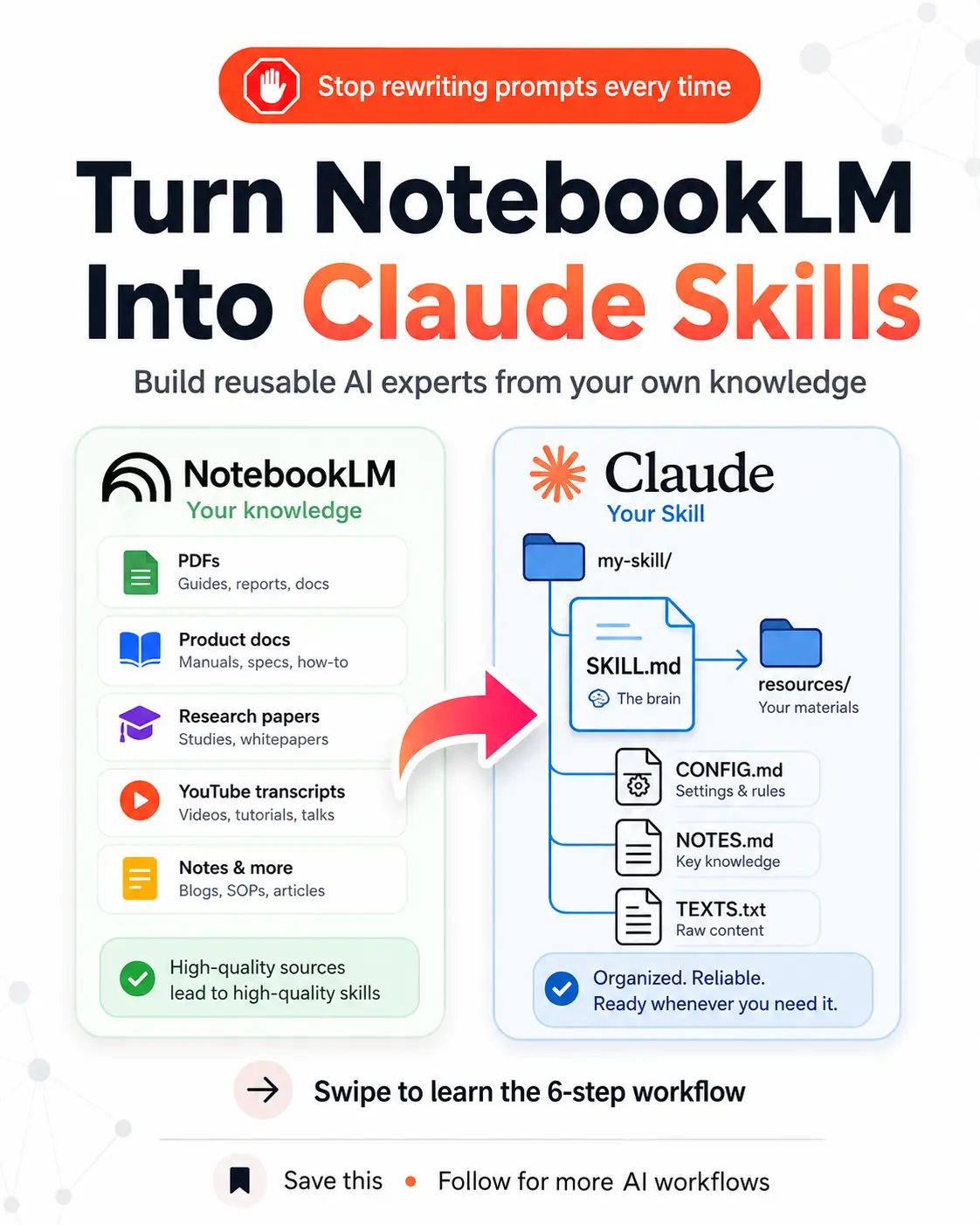
Stop rewriting prompts every time
Turn NotebookLM Into Claude Skills
Build reusable AI experts from your own knowledge
NotebookLM
Your knowledge
PDFs
Guides, reports, docs
Product docs
Manuals, specs, how-to
Research papers
Studies, whitepapers
YouTube transcripts
Videos, tutorials, talks
Notes & more
Blogs, SOPs, articles
High-quality sources
lead to high-quality skills
Claude
Your Skill
my-skill/
SKILL.md
The brain
resources/
Your materials
CONFIG.md
Settings & rules
NOTES.md
Key knowledge
TEXTS.txt
Raw content
Organized. Reliable.
Ready whenever you need it.
Swipe to learn the 6-step workflow
Save this
Follow for more AI workflows
2/9
Most people still do this the hard way
Why this workflow is so powerful
VS
Without
this system
Rewriting prompts
every time
Inconsistent outputs
More hallucinations
Lots of manual editing
Knowledge stays
scattered
With
NotebookLM + Claude Skills
Reusable AI experts
Grounded in your
own docs
Faster repeatable results
Better accuracy and
consistency
Easier team knowledge reuse
Your knowledge becomes a
reusable workflow—not just another chat.
Swipe for the 6 steps
3/9
High-quality inputs = high-quality skills
Step 1 -
Collect your knowledge
Gather the best sources to build expert-level skills
PDFs
Guides, reports,
whitepapers
Product
documentation
Manuals, specs, how-to's,
feature docs
Research
papers
Studies, analyses,
academic papers
Blog
articles
Tutorials, guides,
insights
YouTube
transcripts
Videos, talks,
interviews
Company
SOPs
Processes, policies,
standard steps
Training
manuals
Course materials,
onboarding docs
Notes / FAQs
Internal notes,
Q&A, references
TIP: Choose sources that are clear, accurate, and specific
to the task you want Claude to do.
NotebookLM works best when your source material is strong.
Next: turn those sources into a SKILL.md
4/9
Let NotebookLM structure the knowledge
Step 2 -
Generate a complete SKILL.md
PROMPT
Using only the uploaded sources, create a complete
SKILL.md file. Include: Role,
objectives, workflow,
constraints, rules, best
practices, output format, and practical examples.
Do not add information
not found in the sources.
SKILL.md
Complete output
Role
Objectives
Workflow
Constraints
Rules
Best practices
Output format
Examples
This turns messy information into a
reusable instruction system Claude can follow.
Next: add the Skill to Claude
5/9
Make it ready whenever you need it
Step 3 -
Add the Skill
to Claude
my-skill/
SKILL.md
resources/
Your materials
CONFIG.md
Settings & rules
NOTES.md
Key knowledge
TEXTS.txt
Raw content
Place the generated
SKILL.md in your
Claude Skills directory
Keep related reference
materials together
Use clear names for
easy reuse
Update the files when your knowledge
changes
Once saved, the Skill becomes a reusable expert
instead of a one-off prompt.
Next: build focused Skills
6/9
One Skill = one clear job
Step 4 -
Create focused Skills
Copywriting
Write clear, persuasive
copy that converts.
Email drafting
Write professional,
on-brand emails.
Landing pages
Create high-converting
landing page content.
Customer
support
Help customers with
accurate, friendly
responses.
SEO content
Write SEO-optimized
content that ranks.
Documentation
Write clear guides,
manuals, and how-to docs.
Code reviews
Review code for
quality, bugs, and
best practices.
Research
Find, summarize, and
structure reliable
information.
Data analysis
Analyze data and
turn it into clear
insights.
FAQ generation
Create helpful
FAQs and answers.
Instead of one massive prompt, create smaller
specialized Skills that solve one problem exceptionally well.
Narrow Skills are easier to maintain, test, and improve.
Next: why this improves reliability
7/9
Grounded knowledge beats generic prompting
Step 5 -
Improve reliability
When instructions come
directly from your own
reference material, Claude
stays aligned with trusted
information.
Better accuracy
More
consistent outputs
Reduced
hallucinations
Less manual
editing
Stronger alignment
with your process
Pro tip: Keep your source material updated
and test each Skill on real tasks.
Reliable outputs come from reliable inputs.
Next: build your Skills library
8/9
Build reusable AI experts over time
Step 6 -
Grow your Skills library
Each Skill captures a specific expertise. Over time, your library grows.
My Skills Library
Sales copy Skill
High-converting
sales messaging
Research Skill
Deep research &
insight synthesis
Support Skill
Customer support
answers & FAQs
Documentation Skill
Guides, manuals &
knowledge docs
Code review Skill
Review code for quality,
security & best practices
SEO Skill
Optimize content for
search & visibility
Analysis Skill
Analyze data & extract
actionable insights
Keep adding Skills
as your knowledge base expands
Clone and refine
Skills for niche
tasks
Version your
best-performing
Skills
Reuse them
across different
projects
NotebookLM
manages your knowledge
Claude
executes the work.
The goal is a library of reusable experts—not a pile of prompts.
One final recap on the next slide
9/9
Save this workflow
The 6-step system
at a glance
1
Collect
knowledge
2
Generate
SKILL.md
3
Add it
to Claude
4
Create
focused Skills
5
Improve
reliability
6
Grow your
Skills library
Most people keep writing prompts from scratch.
Smarter users build reusable Skills once—
and use them again and again.
Comment 'SKILL' if you want the idea
Follow for more useful AI workflows
Save this carousel for later