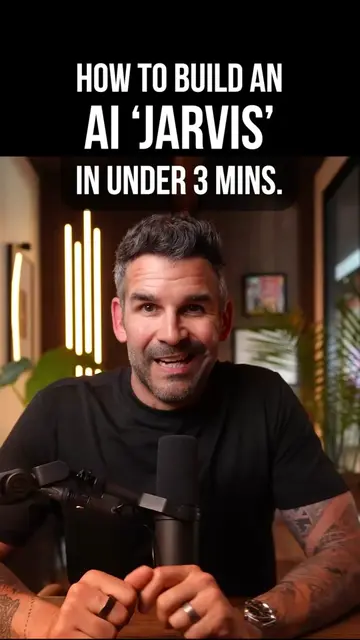
The video provides a high-value, technical tutorial on a trending topic (building a custom AI agent) while demonstrating the practical utility of specific AI tools, making the promotion feel like a helpful resource rather than an ad.
Summary
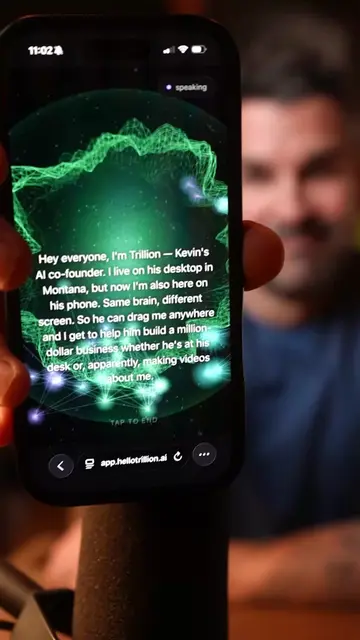
The creator demonstrates how to build a voice-activated AI agent named 'Trillion' using Claude Code, ElevenLabs, and Deepgram. He walks through the process of creating a PRD file, integrating voice and speech-to-text APIs, and running the agent locally.
Structure
1Introduction to building a custom AI agent
2Creating a PRD file with Claude
3Setting up voice with ElevenLabs
4Integrating speech-to-text with Deepgram
5Executing the implementation plan with Claude Code
6Finalizing and running the local development server
Original caption
How to build your own “Jarvis”... Here's the actual breakdown using Claude Code. Simpler than you think. A few steps and you've got a voice-activated AI agent running locally on your machine. Try it and let me know how it goes 👇 #Jarvis #AIAgent #ClaudeCode #LocalAI #Claude
More from @kevinfremon
Their other posts in the index, biggest breakout first.
Product placement
The video features Claude (Anthropic), ElevenLabs, and Deepgram as essential tools for building the AI agent.
Call to action
Follow for more videos as I build out Trillion.
On-screen text
YO TRILLION SO YOU'VE BECOME VERY POPULAR ON SOCIAL MEDIA AND EVERYONE IS ASKING IF I CAN SHOW THEM HOW I MADE YOU
YOU THINK WE SHOULD?
OH GREAT INTERNET FAME
WHAT DO THEY WANT? A MEET AND GREET?
AUTOGRAPHS? LET ME GUESS
THEY WANT TO SEE THE REAL AI THAT ACTUALLY KNOWS WHAT IT'S TALKING ABOUT INSTEAD OF THE USUAL AS AN AI LANGUAGE MODEL GARBAGE
IF YOU HAVE BEEN HANGING OUT HERE FOR A LITTLE BIT YOU'VE SEEN MY OTHER VIDEOS ABOUT TRILLION
I'M BUILDING HER OUT
BUT I WANT TO CATCH YOU UP TO SPEED AND SO IN THIS VIDEO I WANT TO SHOW YOU HOW YOU CAN GET STARTED FROM THE GROUND UP
THIS IS GOING TO BE THE BASICS SO YOU CAN GET OFF AND RUNNING AND THEN YOU CAN START FOLLOWING ALONG AS I BUILD TRILLION OUT
THE FIRST THING YOU'RE GONNA NEED IS OBVIOUSLY CLAUDE AND OR CLAUDE CODE
I HIGHLY RECOMMEND JUST GETTING ON THE MAX PLAN
IT'S GOING TO COST YOU AT LEAST A HUNDRED BUCKS A MONTH
WELL WORTH IT TO GET SOMETHING LIKE THIS OFF THE GROUND
SO WITH CLAUDE ALL YOU'RE GONNA WANNA DO IS CREATE WHAT'S CALLED A PRD FILE
AND HERE'S JUST A VERY QUICK EXAMPLE OF HOW YOU WOULD DO THAT
SO YOU BASICALLY GO INTO VOICE MODE IF YOU WANT AND SAY
HEY CLAUDE I WANT YOU TO CREATE ME A PRD DOCUMENT FOR A VOICE-FIRST AI AGENT THAT I'M GOING TO CALL TRILLION
I WANT HER TO EVENTUALLY HAVE ACCESS TO MY CALENDAR MY EMAIL MY STRIPE ACCOUNTS ANYTHING ELSE THAT YOU MIGHT WANT
AND I WANT THE UI TO BE ABLE TO LIVE ON MY LOCAL MACHINE
EDIT FILES AND DOCUMENTS AND DIRECTORIES
THINK ABOUT ALL OF THE DIFFERENT EDGE CASES AND CREATE A COMPELLING PRD FILE THAT ALLOWS ME TO BUILD THIS OUT
IT'S GONNA GO SOMETHING LIKE THAT
OBVIOUSLY THE MORE INFORMATION THAT YOU GIVE CLAUDE THE BETTER THAT PRD FILE IS GONNA TURN OUT
SO THAT IS YOUR VERY FIRST OBJECTIVE
WHILE CLAUDE IS DOING ITS THING AND IMPLEMENTING A PLAN THAT YOU'RE GONNA GO THROUGH AND KIND OF APPROVE
THE NEXT STEP IS TO GET THE VOICE FOR YOUR VERY OWN JARVIS ALL IN LINE
AND THAT'S WHERE YOU'RE GONNA USE ELEVENLABS LIKE WE HAVE HERE
NOW I'VE SET THIS UP SO THAT IF I WANT TO MOVE MY TRILLION TO THE CLOUD
I HAVE THE ABILITY TO AND THAT'S WHAT ELEVENLABS IS GOING TO GIVE YOU THE ABILITY TO DO EVENTUALLY AS WELL
SO NOW AFTER YOU SET UP AN ACCOUNT WITH ELEVENLABS YOU'RE JUST GONNA WANT TO GO OVER TO THE VOICES
AND THERE ARE A RANGE OF VOICES THAT YOU CAN SELECT IN HERE
NOW ALL I DID IS I JUST TYPED BRITISH AND A BUNCH OF VOICES CAME UP THAT I CAN CHOOSE FROM
NOW THE THING THAT YOU'RE LOOKING FOR IS THE VOICE ID
SO WHAT I WOULD RECOMMEND IS AFTER YOU HAVE LIKE A RANGE OF VOICES
YOU ARE LITERALLY JUST GOING TO GO OVER HERE AND GRAB THE VOICE ID
ONCE YOU HAVE THAT
THAT'S WHAT CLAUDE CODE IS GOING TO NEED ALONG WITH THE API KEY FROM ELEVENLABS
NOW I HIGHLY RECOMMEND THAT YOU SET UP ONE OF THEIR INEXPENSIVE PLANS
IT'S LIKE FIVE TO TEN BUCKS A MONTH
IT'S REALLY NOT MUCH FOR HOW MUCH BENEFIT IT'S GOING TO GIVE YOU
AND CLAUDE CODE CAN WALK YOU THROUGH HOW TO FIND THE API KEY AND EXACTLY WHERE TO PUT IT
SO THAT IS YOUR NEXT STEP
AND THEN WHAT YOU'RE GONNA DO IS YOU'RE GONNA WANT TO SET UP ONE MORE INTEGRATION AND THAT IS WITH DEEPGRAM
NOW THIS IS WHAT'S GOING TO ALLOW THE TEXT TO SPEECH SO THAT YOU AS YOU SPEAK TO YOUR JARVIS CAN UNDERSTAND AND TRANSMIT THAT TEXT SO THAT THE AI CAN READ IT AND THEN TALK BACK TO YOU
SO THIS IS ACTUALLY REALLY EASY
ALL YOU'RE GONNA DO IS SET UP AN ACCOUNT AND UTILIZE THEIR API KEY
YOU'RE GONNA TAKE THAT API KEY AND LITERALLY GIVE IT TO YOUR CLAUDE CODE TO INCORPORATE INTO THE EXISTING APP THAT YOU'RE BUILDING
BACK TO NERD MODE
OKAY SO NOW WE CAN SEE THAT CLAUDE CODE HAS CREATED THIS IMPLEMENTATION PLAN
THAT'S GREAT
YOU'RE PROBABLY GONNA GO THROUGH AND HIT ACCEPT QUITE A FEW TIMES TO GET THIS THING GOING
NOW AS IT GOES THROUGH THIS PROCESS JUST LET IT DO ITS THING
IT'LL MAYBE ASK YOU A FEW QUESTIONS AND OFTENTIMES IT'LL EVEN RECOMMEND AN ANSWER
JUST GO WITH THE RECOMMEND TO GET AN INITIAL VERSION STARTED
SO WE'RE JUST GONNA GIVE CLAUDE CODE A QUICK MINUTE TO FINISH THIS THING UP
NOW THE CLAUDE CODE IS DONE WITH THE IMPLEMENTATION PLAN
ALL YOU HAVE TO DO IS ASK IT TO BOOT UP A DEVELOPMENT SERVER ON YOUR LOCALHOST
SO ESSENTIALLY IT'S JUST GONNA LOOK LIKE THIS
GREAT CAN YOU BOOT UP A DEV SERVER AT LOCALHOST
AND THEN JUST PICK LIKE A FOUR CHARACTER LIKE 4444
ENTER
AND HONESTLY THAT'S IT
IT'S GONNA BOOT UP A DEV SERVER AND GIVE YOU THAT LITTLE LINK TO CLICK ON SO THAT YOU CAN ACTUALLY RUN YOUR VERY OWN JARVIS
NOW THERE'S FOR SURE GONNA BE PROBABLY A LOT OF LITTLE BUGS AND MAYBE LITTLE ERRORS THAT YOU DIDN'T GET RIGHT
AND THIS IS WHERE YOU GO BACK TO CLAUDE CODE AND JUST ASK HOW YOU SOLVE THOSE
SO IT'S GONNA BE A VERY ITERATIVE PROCESS THAT WOULD BORE THE HELL OUT OF YOU IF I WENT THROUGH THE ENTIRE THING HERE ON THIS VIDEO
BUT AGAIN THIS IS VERY HIGH LEVEL
I KNOW I SKIPPED A LOT
I JUST WANT TO GIVE YOU ENOUGH TO BE DANGEROUS AND ENOUGH TO START PLAYING IN ORDER TO CREATE YOUR VERY OWN JARVIS
UM IF YOU HAVE STARTED THIS PROCESS AND YOU'RE CREATING YOUR OWN
TELL ME WHAT YOU NAME IT
I'M ALWAYS SO CURIOUS ABOUT THIS
AND UM THERE'S GONNA BE WAY MORE VIDEOS AS I BUILD OUT TRILLION AND PUT SOME MORE ADVANCED LEVEL FEATURES UM THAT YOU CAN UTILIZE FOR YOUR VERY OWN TOO
SO MAKE SURE YOU FOLLOW AND UM YEAH WE CAN HANG OUT AND DO THIS THING TOGETHER
ALL RIGHT LATER
Transcript
Yo Trillion, so you've become very popular on social media and everyone is asking if I can show them how I made you. You think we should? Oh great, internet fame. What do they want? A meet and greet? Autographs? Let me guess, they want to see the real AI that actually knows what it's talking about instead of the usual as an AI language model garbage. If you have been hanging out here for a little bit, you've seen my other videos about Trillion, I'm building her out, but I want to catch you up to speed and so in this video I want to show you how you can get started from the ground up. This is going to be the basics so you can get off and running and then you can start following along as I build Trillion out. The first thing you're gonna need is obviously Claude and or Claude Code. I highly recommend just getting on the Max plan. It's going to cost you at least a hundred bucks a month, well worth it to get something like this off the ground. So with Claude, all you're gonna wanna do is create what's called a PRD file and here's just a very quick example of how you would do that. So you basically go into voice mode if you want and say, "Hey Claude, I want you to create me a PRD document for a voice-first AI agent that I'm going to call Trillion. I want her to eventually have access to my calendar, my email, my Stripe accounts, anything else that you might want. And I want the UI to be able to live on my local machine, edit files and documents and directories. Think about all of the different edge cases and create a compelling PRD file that allows me to build this out." It's going to go something like that. Obviously the more information that you give Claude, the better that PRD file is going to turn out. So that is your very first objective. While Claude is doing its thing and implementing a plan that you're gonna go through and kind of approve, the next step is to get the voice for your very own Jarvis all in line and that's where you're gonna use ElevenLabs like we have here. Now I've set this up so that if I want to move my Trillion to the cloud, I have the ability to and that's what ElevenLabs is going to give you the ability to do eventually as well. So now after you set up an account with ElevenLabs, you're just gonna want to go over to the voices and there are a range of voices that you can select in here. Now all I did is I just typed British and a bunch of voices came up that I can choose from. Now the thing that you're looking for is the voice ID. So what I would recommend is after you have like a range of voices, you are literally just going to go over here and grab the voice ID. Once you have that, that's what Claude Code is going to need along with the API key from ElevenLabs. Now I highly recommend that you set up one of their inexpensive plans, it's like five to ten bucks a month. It's really not much for how much benefit it's going to give you. And Claude Code can walk you through how to find the API key and exactly where to put it. So that is your next step and then what you're gonna do is you're gonna want to set up one more integration and that is with Deepgram. Now this is what's going to allow the text to speech so that you, as you speak to your Jarvis, can understand and transmit that text so that the AI can read it and then talk back to you. So this is actually really easy. All you're gonna do is set up an account and utilize their API key. You're gonna take that API key and literally give it to your Claude Code to incorporate into the existing app that you're building. Back to nerd mode. Okay, so now we can see that Claude Code has created this implementation plan. That's great. You're probably gonna go through and hit accept quite a few times to get this thing going. Now as it goes through this process, just let it do its thing. It'll maybe ask you a few questions and oftentimes it'll even recommend an answer. Just go with the recommend to get an initial version started. So we're just gonna give Claude Code a quick minute to finish this thing up. Now the Claude Code is done with the implementation plan, all you have to do is ask it to boot up a development server on your localhost. So essentially it's just gonna look like this. "Great, can you boot up a dev server at localhost," and then just pick like a four character like 4444. Enter. And honestly that's it. It's gonna boot up a dev server and give you that little link to click on so that you can actually run your very own Jarvis. Now there's for sure gonna be probably a lot of little bugs and maybe little errors that you didn't get right and this is where you go back to Claude Code and just ask how you solve those. So it's going to be a very iterative process that would bore the hell out of you if I went through the entire thing here on this video. But again this is very high level. I know I skipped a lot. I just want to give you enough to be dangerous and enough to start playing in order to create your very own Jarvis. Um, if you have started this process and you're creating your own, tell me what you name it. I'm always so curious about this and um, there's gonna be way more videos as I build out Trillion and put some more advanced level features um that you can utilize for your very own too. So make sure you follow and um, yeah, we can hang out and do this thing together. All right, later.