On-screen text
Claude Code Tips
VIDEO 3: ADVANCED
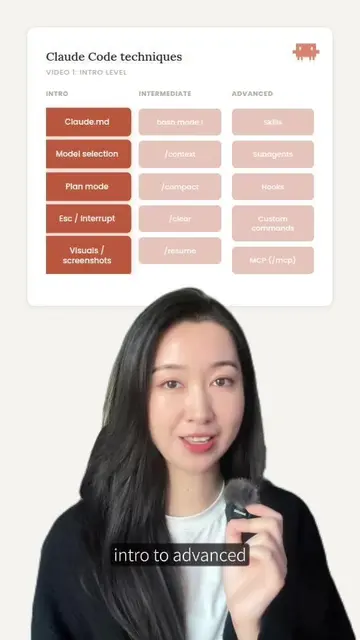
BEGINNER
Claude.md
Model Choice
Plan Mode
Escape Stop
Screenshots
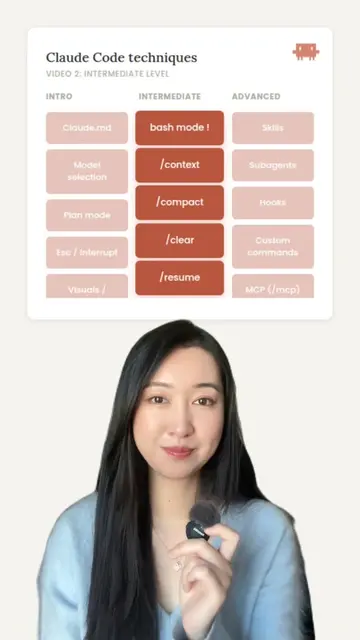
INTERMEDIATE
bash mode !
/context
/compact
/clear
/resume
ADVANCED
Hooks
Subagents
Custom Cmd
Permissions
MCP
Claude Code - Part 3
Hooks
this is part 3 of
How to Master Claude Code
from intro to advanced
Today we're going
to talk about an advanced technique
called hooks
we're gonna go through what it is,
what it's good for
what a hook looks like
and then do an example to show you
how to put in a hook
Hooks
Custom actions that automatically run at
specific stages in Claude Code. Trigger
before/after tool use, on permission
requests, when calls complete, or at session
start/end. Automate initialization, logging,
checks, and cleanup tasks.
so hooks are customizable
things that Claude Code can do for
you
at different points of the life cycle
so some common points within a life cycle include
Event
Trigger
Use Case
PreToolUse
Before tool
Block risky commands,
validate input
PostToolUse
After tool
Auto-format code, run
tests, log changes
PermissionRequest
Permission ask
Alert sound, custom
approval flow
Stop
Response done
Play notification, send
Slack message
SessionStart
Session begins
Load context, initialize
environment
SessionEnd
Session closes
Cleanup, final logging
so some common points within a life cycle include
pre tool used - before you use the tool
post tool use - after you use the tool
permission request
which is when permission is requested of you
Stop
which is when Claude has finished a task
session start when you start Claude
code
session start when you start Claude
code and session end
when you're ending a session with Claude code
these are all parts of the lifecycle
where you can ask Claude to do something specific
when this event is triggered
for example when a permission is requested
for example when a permission is requested
you can ask Claude to notify you
or send you a sound alert
or for example at a session start
you can ask Claude Code to
load context or initialize the environment
another example is when a session ends
you can automatically get Claude Code to
do some cleanup and some logging
so think of it as when we get to this point
or this event
Claude Code will automatically do these things for you
now let's go through what a hook looks like
and this is what we're going to put in
at the end
as an example
this hook is going to do two things
it will play a chirping sound
when it's asking me for permission on
something
and then it will play a meow sound
when it is finished doing a command
I don't know about you guys
but I find myself constantly checking
the screen
in order to find out if Claude Code
is waiting for me for permission
or waiting for me for the next move
so I wanted it to play these sounds at
these stages
now let's look through each line
"hooks" -- Root configuration key
This is the parent object that contains all your hook
definitions. Everything else nests inside this.
OTHER VARIATIONS:
"hooks" (always lowercase, always plural)
Located in: ~/.claude/settings.json
at the very top this says hook
this is the root configuration key
this kind of just says
this whole entire object is a hook
the next one is permission request
"PermissionRequest" -- Event type
This specifies WHEN the hook fires. When Claude
asks for permission, this hook triggers.
OTHER VARIATIONS:
"Stop" -- When Claude finishes
"PreToolUse" -- Before any tool runs
"PostToolUse" -- After a tool completes
"SessionStart" -- When you start
"SessionEnd" -- When you exit
"Notification" -- When Claude needs attention
this is an event type
so this is
I mentioned about the different parts of the lifecycle
you can change it to stop
pre tool use, post tool use
session start, session end, notification
any point of development
the next one is a matcher
"matcher" -- Filter condition
Specifies WHICH tools or conditions trigger the
hook. Empty string "" means match everything.
You can narrow it down to specific tools.
OTHER VARIATIONS:
"Bash" -- only Bash tool
"Edit|Write" -- either Edit OR Write
"--" -- match all (wildcard)
"^re" -- regex patterns work too
this is a filtering condition
so you can specify the tool or condition
that it must match
for me there's no specific condition
anytime it's asking for permission request
it should be playing this sound
"hooks" -- Handler array
Array of actions that execute when the event fires
and matcher matches. Each object is one
command/request/prompt.
Can have multiple handlers
Handlers run in sequence
Each handler needs "type" and
"command"/"uri"/"prompt"/"agent"
the next one is the start of a hook
array
so you can actually get it to do multiple actions
under this condition
notice here I only have one thing in my array
because I'm only asking it to play one sound
if I say you want it to play a sound
and have it pop up on your screen
then you can put two of those items in the same array
"type" -- Handler type
Specifies HOW the handler executes. "command"
means run a shell command. The type determines
what the next key should be.
OTHER VARIATIONS:
"command" + next key: "command"
"http" + next key: "uri"
"prompt" + next key: "prompt"
"agent" + next key: "agent"
for this example
this is of type command
which means it will run a shell
command
"command" -- The actual shell command
The shell command that runs when all conditions
match. Also access to environment variables like
$CLAUDE_TOOL_INPUT_FILE_PATH,
$CLAUDE_SELECT_DIR and
$CLAUDE_TOOL_INPUT_FILE_PATH.
OTHER VARIATIONS:
"afplay ~/claude/sounds/meow.mp3 & (play
sound)"
npx prettier --write $FILE (format code)
npm test -- --findRelatedTests (run tests)
echo "msg" >> log.txt (log event)
and then the actual command it will
run is
it will go into this folder and play this
MP3 sound called chirp
so this is when permission is requested
now the same thing happens here
this is when
instead of permission requested this is
the event stop
so when Claude Code has finished
running
or stopped running
play the sound meow
so that's the basic structure
there are a few other optional parameters that you can put in there
you can always ask Claude Code
just to write it out for you
let me show you how to put this chunk of code in
so that it works
so you're gonna open up your Claude folder
and open a new folder here called sounds
soundtracks in there
and then open up your settings
here you'll see there's already some text in here
take your hook and paste it in here
so you see this is my chirp and this is
my meow
save and close and that's it that's all
you need
now let's see an example of it working
permission requested *chirp*
I'm providing my approval
Task Complete *meow*
(the sound actually played a bit before
the complete message got displayed)
so that's basically how a hook works
it's really good for anything
you want to automatically run
when you are at a point in the life
cycle
or at an event
I hope that's helpful
and I'll see you at the next one
for another advanced technique in Claude Code
 Claude Codeseen in 193 videos →