On-screen text
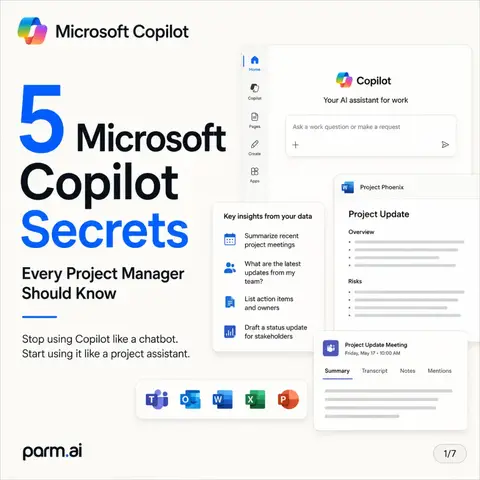
Microsoft Copilot
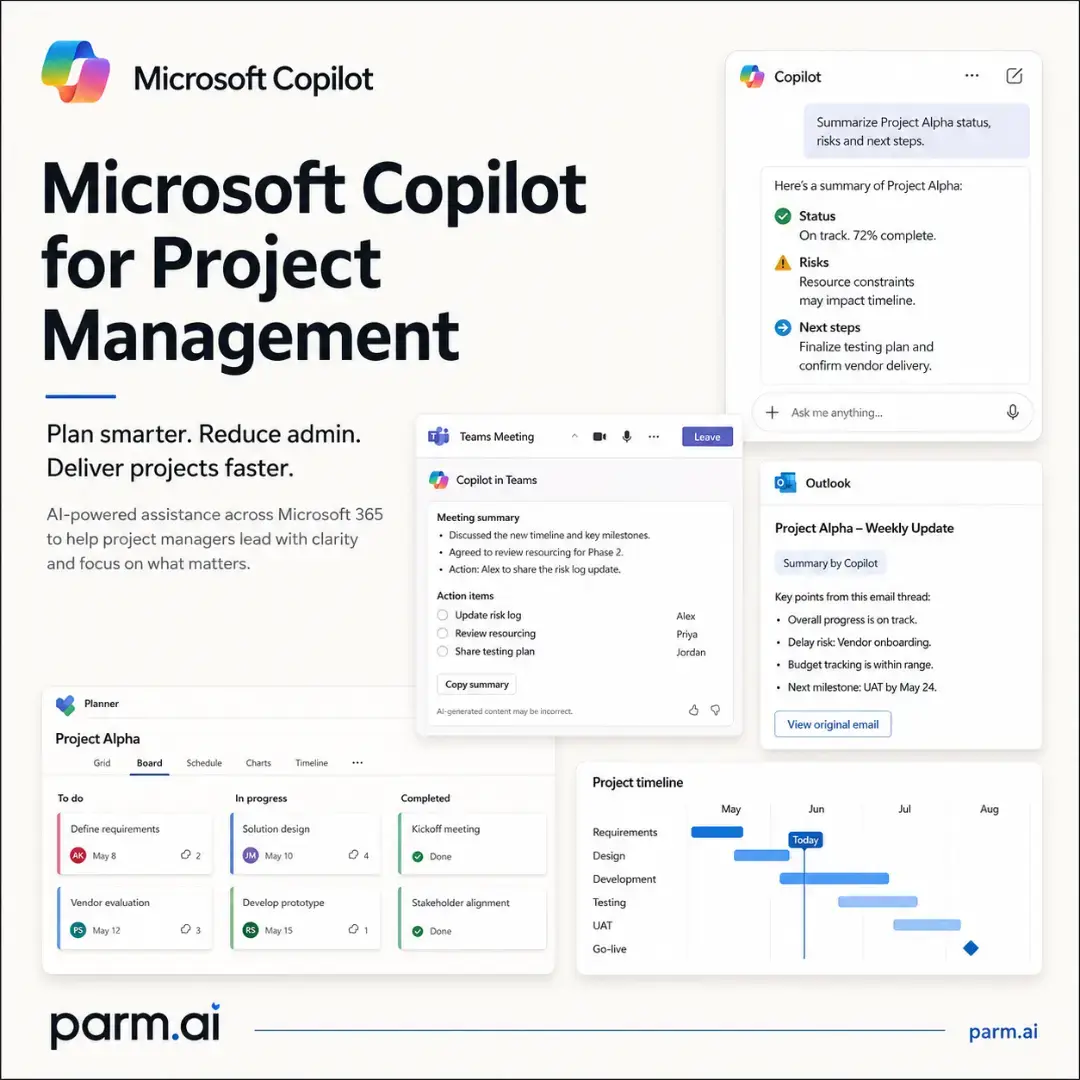
Microsoft Copilot for Project Management
Plan smarter. Reduce admin. Deliver projects faster.
AI-powered assistance across Microsoft 365 to help project managers lead with clarity and focus on what matters.
Copilot in Teams
Meeting summary
- Discussed the new timeline and key milestones.
- Agreed to review resourcing for Phase 2.
Action items:
- Update risk log
- Review resourcing
- Share testing plan
Alex
Priya
Jordan
Planner
Project Alpha
Grid Board Charts Schedule
To do
Define requirements
May 8
Vendor evaluation
May 12
In progress
Solution design
May 10
Develop prototype
May 15
Completed
Kickoff meeting
Done
Stakeholder alignment
Done
parm.ai
parm.ai
02 Why Project Managers Use Copilot
Project management isn't just about planning.
Microsoft Copilot brings together information from Microsoft 365 so you can focus on decisions instead of administration.
It's also about maintaining a constant flow of information, updates and decisions.
You're juggling:
Meetings
Discuss, align and follow up
Emails
Long threads and important updates
Status reports
Create, consolidate and share
Risks
Identify, assess and track
Stakeholder updates
Keep everyone informed
Resource planning
Balance capacity and priorities
Copilot in Teams
Project Alpha Weekly Sync
Copilot summary
Discussed timeline for Phase 2:
Risks: resourcing and vendor delays
Action: Priya to update risk log
Next milestone: UAT by May 24
Open in Copilot
Action items
Update risk log
Review resourcing
Share testing plan
Priya
Jordan
Alex
Planner
Project Alpha
Board Grid
To do
Define requirements
May 8
Vendor evaluation
May 12
In progress
Solution design
May 10
Develop prototype
May 15
Completed
Kickoff meeting
Done
Stakeholder alignment
Done
Copilot summary
Summarise the key points from this meeting and list the action items.
Add to page
Outlook
Project Alpha - Weekly Update
Summary by Copilot
Key points from this email thread:
Overall progress is on track.
Risk: Delay risk Vendor onboarding.
Budget tracking is within range.
Next milestone: UAT by May 24.
View original email
Copilot reduces repetitive work so you can lead with clarity and confidence.
parm.ai
parm.ai
03 Where Copilot Helps
Copilot supports every phase of a project
From planning to reporting, Copilot helps you stay organised, informed and in control.
Plan
Create initial project plans
Break work into tasks
Set milestones and dependencies
Identify risks early
Execute
Track tasks and progress
Summarise meetings
Capture action items
Draft updates and communications
Monitor
Identify risks and issues
Highlight overdue work
Analyse workloads
Review progress in real time
Report
Generate stakeholder summaries
Create status reports
Share updates with confidence
Keep everyone aligned
Copilot
Project Alpha overview
Tasks
42
In progress
Overdue
7
Require attention
Completed
29
this month
Recent activity
Teams meeting summarised
10:30 AM
5 Tasks updated in Planner
9:15 AM
Email summary ready
8:45 AM
Ask me anything...
Copilot connects the dots across Microsoft 365 so you can make informed decisions at every stage.
parm.ai
parm.ai
04 Everyday Tasks You Can Automate
Save hours every week
Copilot brings together information from Teams, Outlook, Planner, documents and more-so you can focus on what matters.
Copilot helps you automate time-consuming work:
Weekly status reports
Generate clear updates in seconds
Meeting summaries
Summarise discussions and capture actions
Action lists
Extract action items and assign owners
Email summaries
Get to the point, fast
Risk updates
Identify risks and suggest mitigation steps
Teams
Project Alpha - Weekly Sync
Copilot summary
Discussed progress on the CRM module.
Delays due to vendor onboarding.
Action: Review updated timeline.
Risk: Data migration effort may impact Phase 2.
Action items
Review updated timeline
Follow up with vendor
Share testing plan
Copy summary
AI-generated content may be incorrect.
Priya
Jordan
Alex
Here's a summary of the meeting with key action items:
Discussed progress on the
CRM module.
Delays due to vendor
onboarding.
Action: Review updated
timeline.
Risk: Data migration effort
may impact Phase 2.
Add to page
Copy
Ask me anything...
Outlook
Project Alpha - Weekly Update
Summary by Copilot
Key points from this email thread:
Overall progress is on track.
Risk: Delay risk Vendor onboarding.
Budget tracking is within range.
Next milestone: UAT by May 24.
View original email
Planner
Project Alpha
Board Grid
To do
Define requirements
May 8
Vendor evaluation
May 12
In progress
Solution design
May 10
Develop prototype
May 15
Completed
Kickoff meeting
Done
Stakeholder alignment
Done
Copilot uses the Microsoft 365 permissions you already have.
Always review AI-generated content before sharing.
parm.ai
parm.ai
05 Practical Prompts
Try these Copilot prompts
Clear prompts =
better results
Use Copilot in Microsoft 365 to get real work done faster.
Copy, adapt and make them your own.
Project plan
"Create a six-week project plan for a CRM implementation with milestones, dependencies and risks."
Get a structured plan with phases, key tasks and potential risks.
Catch up
"Summarise all Teams conversations and emails related to Project Alpha from the last seven days."
Quickly understand what happened and what's next.
Risk review
"Identify overdue tasks and recommend mitigation actions."
Get a risk-aware summary with practical recommendations.
Stakeholder update
"Generate a stakeholder-ready weekly project update."
Create a clear, professional update ready to share.
Copilot
Project Alpha
Create a six-week project plan for a CRM implementation with milestones, dependencies and risks.
Project timeline
Week
1
Planning
Design
2
3
Testing
4
Development
5
UAT
6
Go-live
Key tasks
Requirements, scope,
stakeholder alignment
Process mapping,
solution design
Configuration,
integrations
UAT, test cases,
bug fixes
User training,
documentation
Deployment, support
readiness
Dependencies
Requirements
sign-off
Design sign-off
Integration
sign-off
Testing sign-off
Deployment
completion
Risks
Scope changes
Incomplete
requirements
Integration
delays
Build
completion
Low user
adoption
Post-go-live
support
Risks summary
Data migration complexity
User adoption and training
Integration with legacy systems
Let me know if you'd like this in a different format.
Ask me anything...
AI-generated content may be incorrect.
These prompts are examples. Adjust them to your project, team and context.
parm.ai
parm.ai
06 Microsoft Planner + Copilot
Copilot becomes your planning assistant
AI that works where you context
Copilot understands your project context and helps you take the right next steps.
With Microsoft Planner, Copilot helps you build plans, assign work, identify risks and keep projects on track.
Build task lists
Create structured tasks and break work into steps.
Suggest assignments
Recommend the best people based on availability and workload.
Highlight risks
Surface potential issues and at-risk tasks early.
Analyse workloads
See team capacity and balance work across projects.
Recommend next steps
Get data-informed suggestions to keep work moving forward.
Planner
Project Alpha
My Tasks
Portfolio
Goals
To do
Define requirements
May 8
Vendor evaluation
May 12
In progress
Solution design
May 10
Develop prototype
May 15
Completed
Kickoff meeting
Done
Stakeholder alignment
Done
Architecture review
May 5
Add task
Add task
Copilot
Here are insights for Project Alpha:
Risks
2 tasks are at risk of delay.
Data migration plan
(objective: vendor onboarding)
Workload
Alex has 110% capacity
next week.
Balance workload
Progress
72% of tasks on track.
Suggested next steps
Follow up with vendor on
data migration.
Review UAT test cases
with the team.
Ask me anything...
Availability of Copilot in Planner depends on your Microsoft 365 Copilot and Planner licensing. Features may vary by plan and rollout.
parm.ai
parm.ai
07 Key Takeaways
Lead projects with less admin and more impact.
Microsoft Copilot helps project managers focus on decisions, people and outcomes-not repetitive tasks.
Plan smarter.
Create plans, break down work, and identify risks early.
Follow up faster.
Summarise meetings, capture actions and keep everyone aligned.
Report with confidence.
Generate clear, stakeholder-ready updates in seconds.
Manage risks proactively.
Spot issues sooner and get suggestions on what to do next.
Collaborate effectively.
Bring information together from across Microsoft 365 to make better decisions.
Make better decisions.
Use AI insights and real-time data to keep projects on track.
Copilot is your AI assistant across Microsoft 365
It brings context, saves time and helps you lead with clarity.
Give me a summary of Project Alpha and key next steps.
Here's a summary of Project Alpha:
Overall progress is healthy at 72%.
Key milestone "UAT" is on track for May 24.
Risks: data migration complexity and vendor onboarding delays.
5 tasks are overdue and need attention.
Recommended next steps
1 Follow up with vendor on data migration plan.
2 Review and approve UAT test cases.
3 Reassign capacity for overdue tasks.
4 Share weekly update with stakeholders.
Ask me anything...
Remember
Copilot assists you, but great project outcomes still come from great project management.
AI + Your expertise = Project success.
Always review AI-generated content and ensure it's accurate before sharing with your team or stakeholders.
parm.ai
parm.ai