On-screen text
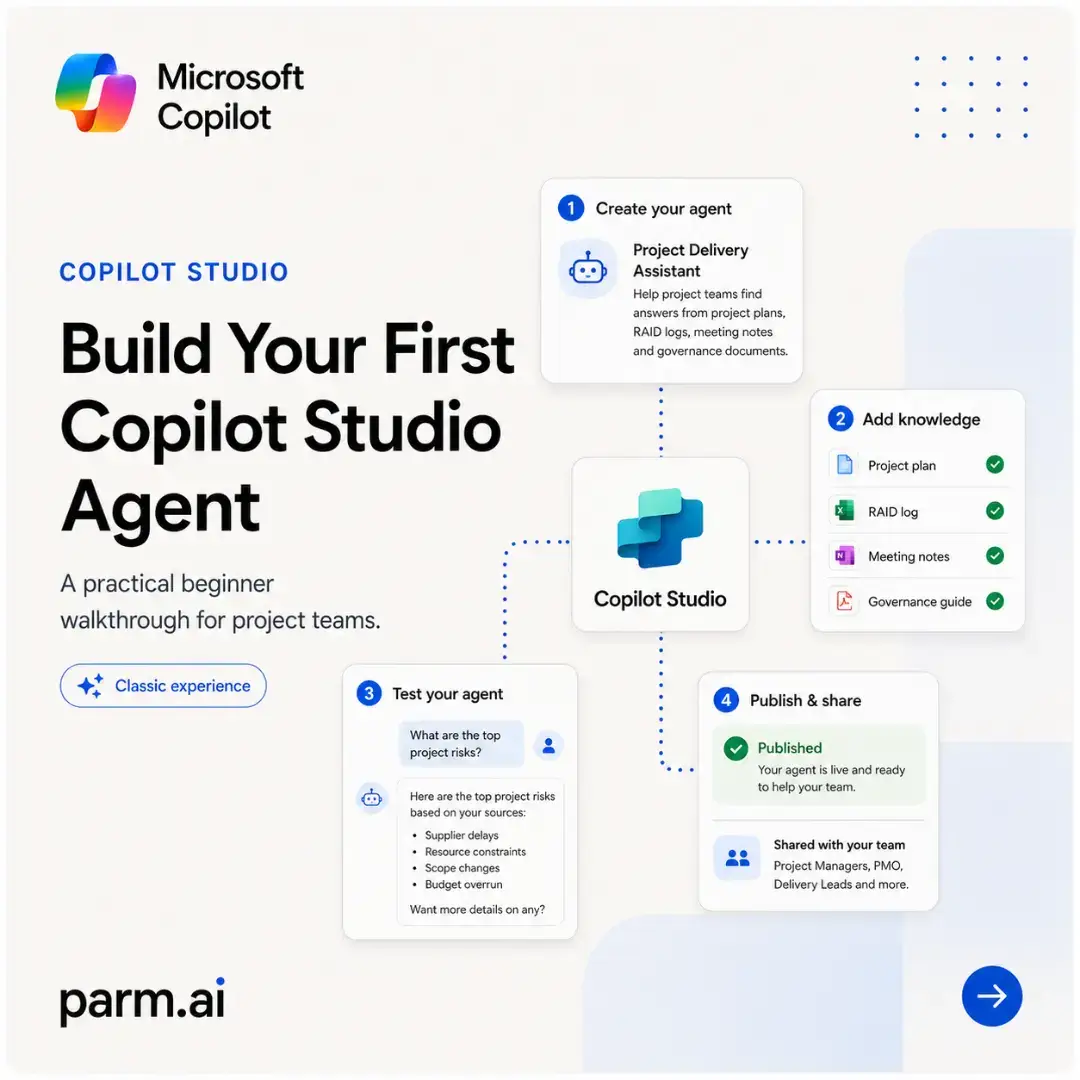
Microsoft Copilot
COPILOT STUDIO
Build Your First Copilot Studio Agent
A practical beginner walkthrough for project teams.
Classic experience
1 Create your agent
Project Delivery Assistant
Help project teams find answers from project plans, RAID logs, meeting notes and governance documents.
Copilot Studio
3 Test your agent
What are the top project risks?
Here are the top project risks based on your sources:
- Supplier delays
- Source constraints
- Scope changes
- Budget overrun
Want more details on any?
parm.ai
1
What Is an Agent?
An agent is a Copilot Studio experience that answers questions, follows instructions and uses approved knowledge to help people complete a task.
- Understands a user's question
- Uses instructions and trusted sources
- Returns a useful answer or next step
Access it in Copilot Studio, then test and share it based on your licence and setup.
Project Delivery Assistant
Example agent
1. User asks
"What are the top project risks?"
2. Agent reasons
Uses its instructions to understand the request.
3. Checks knowledge
Project plan
RAID log
Meeting notes
Governance guide
Top risks: supplier delays, resource constraints and scope changes.
4. Answers clearly
How you can access it
Create and edit in Copilot Studio
Test inside the studio
Share published versions with your team
Availability can vary by licence and organisational setup.
parm.ai
2
What You're Building
A simple Copilot Studio agent that answers project questions using trusted internal documents.
- Uses approved project knowledge
- Responds in plain English
- Helps teams find answers faster
Project Delivery Assistant
Built in Copilot Studio
1. Team question
"What are the top project risks?"
2. Agent
Understands your question and searches trusted sources.
3. Project documents
Looks across approved documents to find relevant information.
Project plan
RAID log
Meeting notes
Governance guide
4. Clear answer
Delivers a concise, accurate answer in plain English.
Top project risks
- Supplier delays could impact the launch timeline.
- Resource constraints in design and engineering.
- Scope changes may affect budget and deadlines.
See RAID log for full details.
parm.ai
3
Start With One Clear Sentence
Describe the job your agent needs to do. Keep your first version narrow, specific and useful.
- Focus on one use case
- Say who it is for
- Mention the source material
1 Create your agent
Describe what your agent should do.
Help project teams find accurate answers from the project plan, RAID log, meeting notes and governance documents.
Copilot Studio will generate a draft for you.
Name
Project Delivery Assistant
Description
Helps project teams find accurate answers from key project artefacts and documents.
Starter instructions
Answer questions using only the provided sources. If unsure, ask for clarification or suggest where to look.
Create agent
parm.ai
4
Give It Trusted Knowledge
Your agent is only as useful as the information it can access. Start with a small set of reliable project sources.
- Start with authoritative documents
- Keep the first scope narrow
- Expand once the answers are reliable
Knowledge sources
Add and manage the sources your agent can search and use to answer questions.
Project plan
Google Docs
RAID log
Excel
Meeting notes
OneNote
Governance guide
PDF
Best practice:
use approved, up-to-date sources.
parm.ai
5
Test With Real Project Questions
Use real questions from your team to see where the agent succeeds, where it hesitates and what needs improving.
- Ask practical day-to-day questions
- Check whether the answer is grounded
- Refine and test again
Test your agent
Try these example questions
1 What are the top project risks?
2 Who owns budget approval?
3 When is the next steering committee?
Here are the top project risks based on your sources:
- Supplier delays could impact the launch timeline.
- Resource constraints in design and engineering.
- Scope changes may affect budget and deadlines.
Grounded in 4 sources
RAID log, Project plan, Risks register, Meeting notes
How to improve
Ask -> Inspect -> Adjust -> Test again
parm.ai
6
Instructions Change Behaviour
The same knowledge can produce very different answers depending on the instructions you set.
Brief for leaders
Instruction
Answer briefly. Highlight the owner, due date and decision needed.
Sample answer
Q2 campaign is on track and within budget.
Owner: Maya (Marketing)
Due date: 30 June 2025
Decision needed: Approve new landing page copy by 23 May.
Detailed for the team
Instruction
Give more context, cite the source and list follow-up actions.
Sample answer
Q2 campaign is on track and within budget.
Context: As of 15 May 2025, engagement is up 18% vs Q1. Paid spend is 92% of plan. The new landing page is in review.
Source: RAID log (15 May 2025), Campaign dashboard.
Follow-up actions:
- Review landing page copy (owner: Maya) - 23 May
- Finalise budget reallocation (owner: Jacob) - 26 May
- Share performance report (owner: Sarah) - 30 May
Set the tone, level of detail and format for purpose.
parm.ai
7
Guide the User From the First Screen
A good welcome message tells people what the agent does and gives them easy ways to start.
- State the purpose clearly
- Set expectations
- Add starter prompts
Project Delivery Assistant
Hi! I can help you find answers from your project documents.
Try asking me something like:
What are the top project risks?
Summarise the last steering committee
Who owns budget approval?
What milestones are due this month?
Your data is secure and used only to help your team.
parm.ai
8
Publish and Share Your Agent
Once the answers are reliable, publish the latest version and make it easy for your team to try.
- Review the latest version
- Publish the agent
- Share it with the right audience
Availability can vary by licence and setup.
1 Review
Agent summary
Version
v1.2
Last updated
23 May 2025
Knowledge items
24
Tests passed
98%
Top risks addressed
Knowledge up to date
Tested with real scenarios
2 Publish
Published
Version 1.2 is live
23 May 2025, 10:15 AM
View published agent
3 Share demo
Share the agent with the right audience so they can explore and provide feedback.
Share with your team
Anyone with the link can try the agent in demo mode.
https://copilot.parm.ai/demo/abc123
Copy
Shared with
Can view
parm.ai
9
The Simple Build Loop
Your first useful agent does not need to be complicated. Start small and improve with real questions.
1 Describe
Define the goal and who it helps. Keep it specific and outcome focused.
2 Add knowledge
Add the right sources like plans, RAID logs and meeting notes.
3 Test
Ask real questions. Check answers for accuracy and usefulness.
4 Improve
Refine instructions and add missing knowledge. Repeat and get better.
5 Publish
Share with your team and track usage and feedback.
Best first use case: a project delivery assistant for project plans, RAID logs and meeting notes.
parm.ai
Build Better Agents with Copilot.
Turn one clear use case into a working Copilot Studio agent your team can actually use.
Follow parm.ai for more Copilot Studio guides
Practical walkthroughs, prompts and examples for business teams.
parm.ai
More AI resources & guides
at parm.ai
Save this post
and build your first agent