How to Lock a WhatsApp Chat
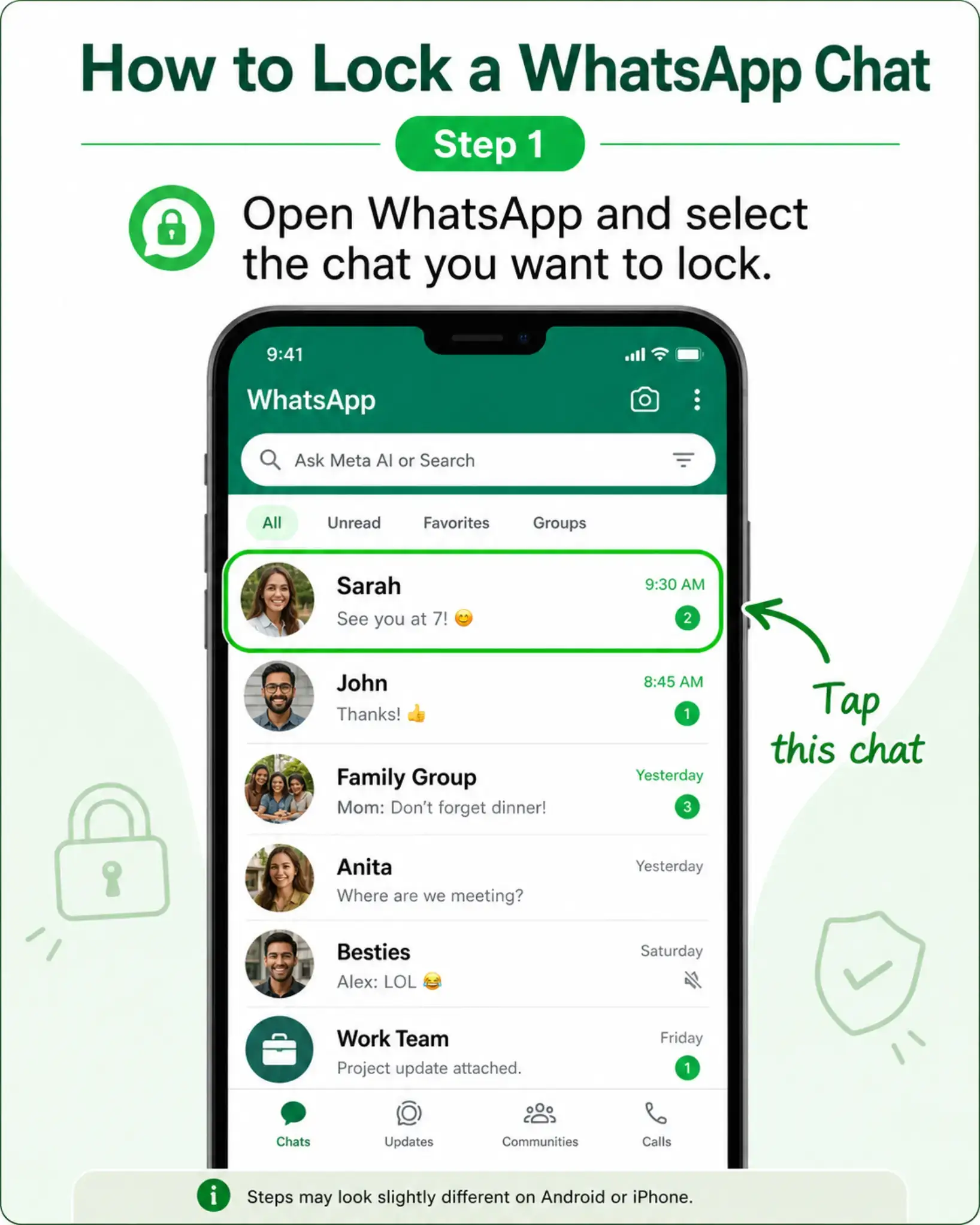
Step 1
Open WhatsApp and select
the chat you want to lock.
9:41
WhatsApp
Ask Meta AI or Search
All Unread Favorites Groups
Sarah
See you at 7!
9:41 AM
John
Thanks!
8:45 AM
Family Group
Mom: Don't forget dinner!
Yesterday
Anita
Where are we meeting?
Yesterday
Besties
Alex: LOL
Saturday
Work Team
Project update attached.
Friday
Chats Updates Communities Calls
i Steps may look slightly different on Android or iPhone.
Tap
this chat
How to Lock a WhatsApp Chat
Step 2
Open the chat, then tap
the person's name at the top.
9:41
Sarah
last seen today at 9:18 AM
Today
Hey! Are we still on
for tonight?
9:17 AM
Hi Sarah Yes, absolutely
9:18 AM
Great! See you at 7!
9:18 AM
Looking forward to it!
9:19 AM
Message
Tap
the name
here
i Steps may look slightly different on Android or iPhone.
How to Lock a WhatsApp Chat
Step 3
On the contact info page, scroll down and tap Chat lock.
9:41
Sarah
last seen today at 9:30 AM
Media, links, and docs
Starred messages
Notifications
Wallpaper
Save to Photos
Disappearing messages
Encryption
Messages and calls are end-to-end
encrypted. Tap to verify.
Chat lock
Advanced chat privacy
Contact details
Off
Off
Tap
Chat lock
i Steps may look slightly different on Android or iPhone.
How to Lock a WhatsApp Chat
Step 4
Turn on Chat lock and confirm
with your fingerprint, Face ID,
or passcode.
9:41
Chat lock
Chat lock
Lock and hide this chat on this device.
Use your fingerprint to open this chat
and read notifications on this device.
Learn more
Hide locked chats
Locked chats will be hidden from your
chat list.
Secret code
Touch ID
Confirm to continue
Cancel
Turn
this on
Confirm
to finish
i Steps may look slightly different on Android or iPhone.
How to Lock a WhatsApp Chat
Step 5
Your chat is now protected
and appears in Locked chats.
9:41
WhatsApp
Ask Meta AI or Search
All Unread Favorites Groups
Locked chats
Sarah
See you at 7!
9:30 AM
John
Thanks!
8:45 AM
Family Group
Mom: Don't forget dinner!
Yesterday
Anita
Where are we meeting?
Yesterday
Besties
Alex: LOL
Saturday
Work Team
Project update attached.
Friday
Chats Updates Communities Calls
Open
here
i Steps may look slightly different on Android or iPhone.
Optional
For extra privacy, add a
Secret Code or turn on App Lock.
9:41
Privacy
Last seen & online
Profile photo
About
Status
Disappearing messages
Default message timer
Start new chats with disappearing
messages set to your timer.
Advanced
Secret Code
Create a code to find locked chats
App Lock
Lock WhatsApp with biometrics
or device passcode
Everyone
Everyone
Everyone
My contacts
Off
On
On
Extra
privacy
i Only you can open locked chats on your device.