Loading video…
Sound

original sound - shanarra_goode
Shanarra | CEO & SaaS Founder · Original audio
0:00–:––
Playing this video’s own audio, so you’ll hear the creator over the sound.
The video breaks down the complex capabilities of an AI tool into easily digestible levels, making advanced features seem accessible. The progression from basic use to advanced integration appeals to a wide audience, from casual users to developers.
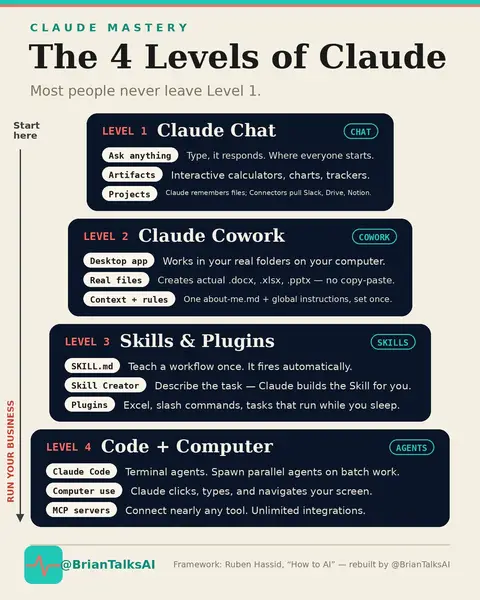
The video outlines five levels of using Claude, an AI tool, from basic questioning to advanced integration. It progresses from simple queries to connecting with other tools, teaching Claude your workflow, using it for code generation, and finally, integrating it as a comprehensive infrastructure.
Most people paying for Claude in Notion are using it as a slightly smarter autocomplete. That's level one. Five levels exist. Level five has Claude learning how you make decisions over time, like an operations manager who never asks for a raise. The gap between one and five isn't technical skill. It's knowing what's possible. Full breakdown in the video. #claudeai #notionai #aitools #aitips #claude
5 levels of CLAUDE
Introduction to the 5 levels of Claude
Level 1: Basic questioning
Level 2: Connecting Claude to existing tools
Level 3: Teaching Claude your workflow
Level 4: Claude Code for developers
Level 5: Integrated AI infrastructure
The video showcases the AI tool 'Claude' and its various levels of functionality, including connecting to other tools like email, calendar, and Notion, as well as its capabilities in code generation and design.
Playing this video’s own audio, so you’ll hear the creator over the sound.
AI assistant for people solving work and creative tasks
Views and creators: posted in the last 30 days (English videos). Videos: all time.
Promotes 3 products. Create free account to see more.
Outliers and viral hits: their videos on Overshot, all time.