Loading video…
All breakouts
5.0Text-HeavyHow-To hookSaaS
Hook
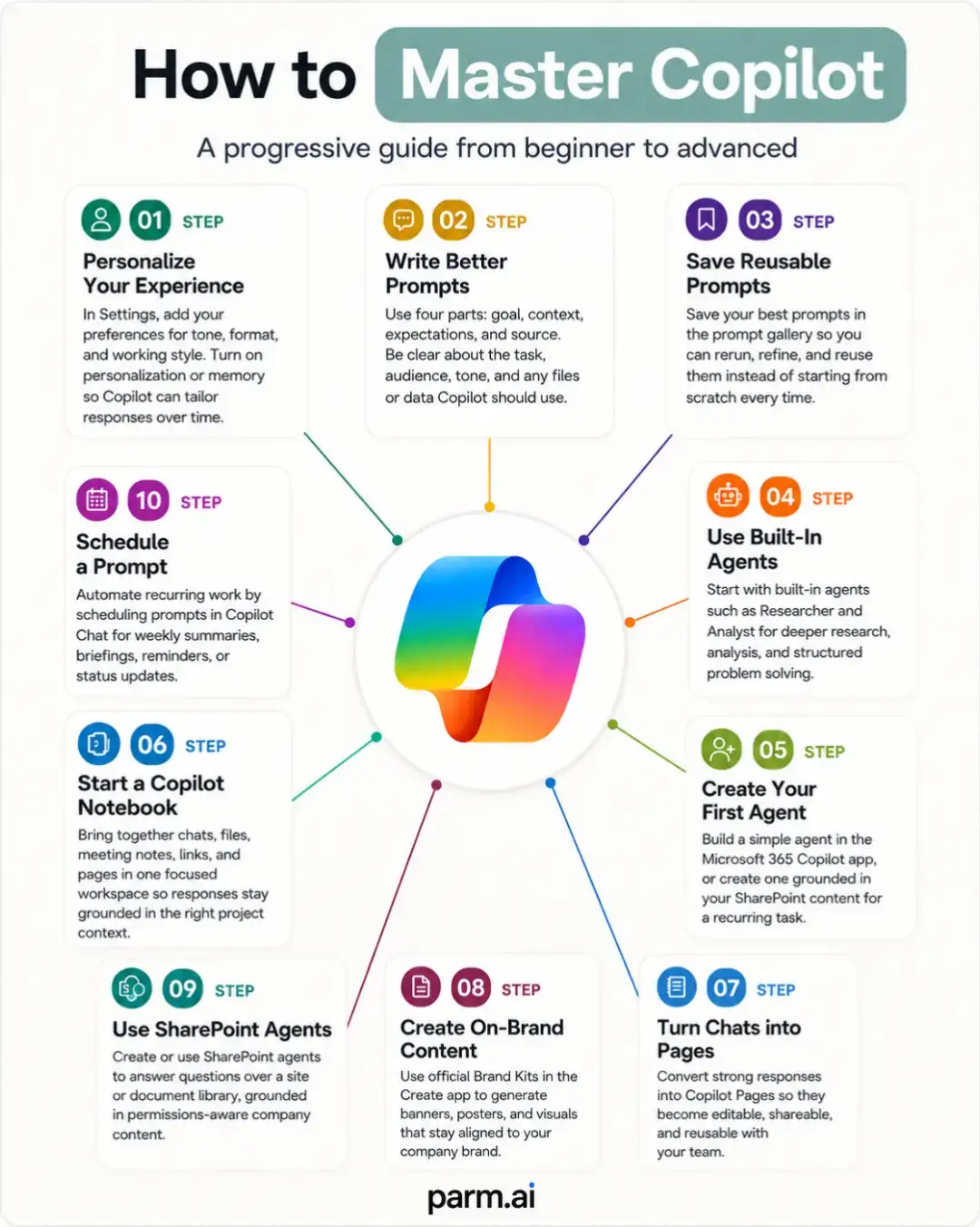
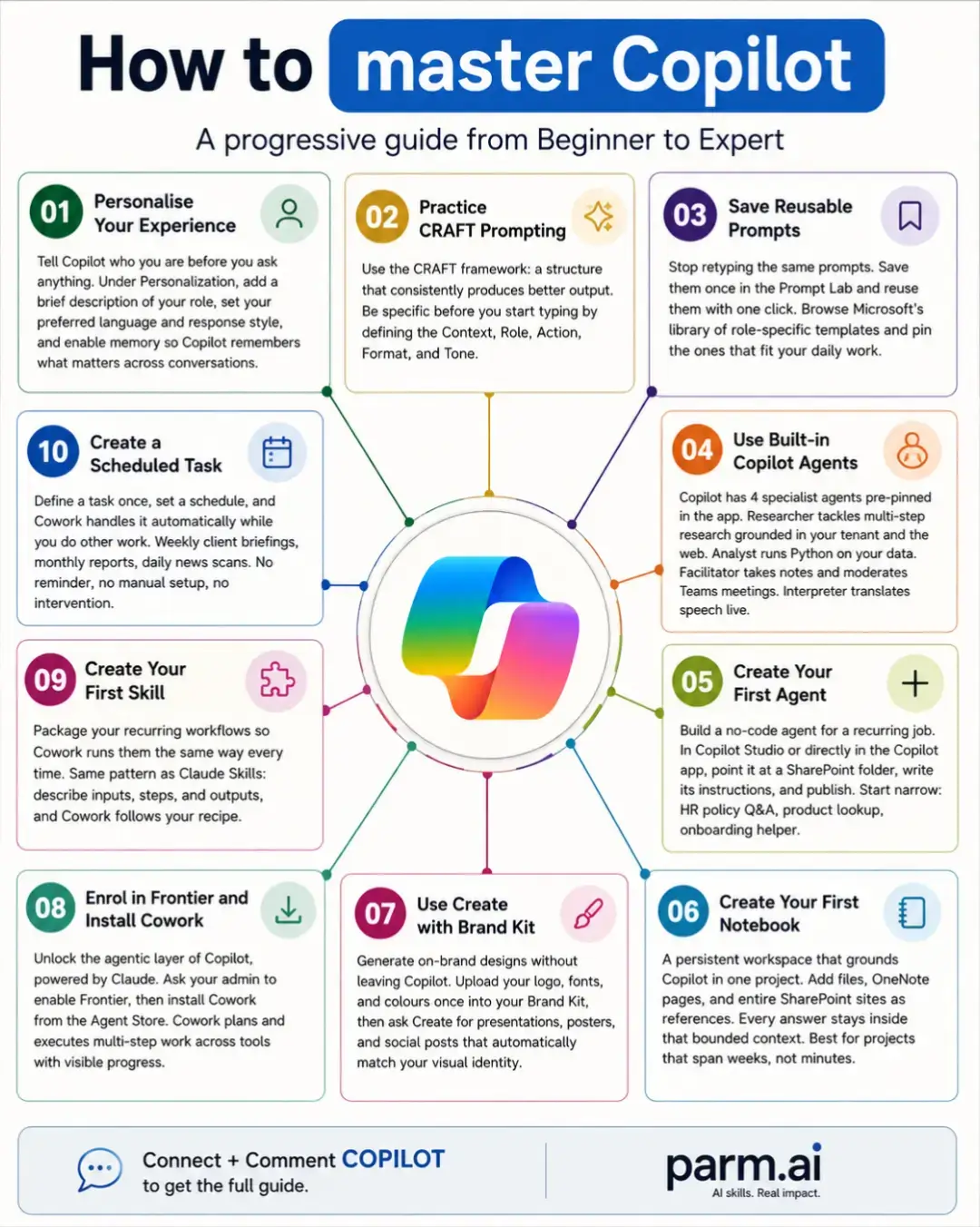
How to master Copilot
@parm.ai
3.6K followers · usually 1.6K views a post
Views
3.4K
Likes
108
Comments
0
Shares
28
Promoted product
Copilot
Why it worked
The infographic provides a clear, structured, and actionable roadmap for users to master Copilot, addressing a common need for practical guidance on AI tools. The visual breakdown into ten steps makes complex information digestible and encourages engagement.
Summary
This infographic outlines a progressive guide to mastering Microsoft Copilot, breaking down the journey into ten practical stages from beginner to expert. It details how to personalize the experience, practice prompting, save prompts, use built-in agents, create skills and agents, and leverage features like 'Create with Brand Kit' and 'Scheduled Task'.
Structure
- 1Introduction to mastering Copilot
- 2Personalizing and practicing prompting
- 3Saving prompts and using built-in agents
- 4Creating custom skills and agents
- 5Leveraging advanced features like 'Create' and 'Scheduled Task'
- 6Call to action for the full guide
Product placement
Copilot ACTS: it is an AI assistant that helps users with various tasks, from personalizing their experience and creating content to building agents and managing projects. Its features are demonstrated throughout the infographic. Removing Copilot would change the entire purpose and content of the video. Microsoft ACTS: Copilot is a Microsoft product, and its integration with Microsoft services like SharePoint and OneNote is mentioned. Removing Microsoft would not change the video's content, as Copilot is the focus.
Original caption
Mastering Microsoft Copilot is not about collecting random prompts or testing every new feature once. It is about progressing from simple assistance to repeatable, structured workflows that consistently improve how you work. This infographic maps that journey across ten practical stages. 🚀 Start by personalising Copilot so its responses better reflect your role, preferred style and working context. Then strengthen your prompting with a clear framework such as CRAFT, helping you define the context, role, action, format and tone before expecting a useful result. Once your strongest prompts begin producing reliable outputs, stop rebuilding them from scratch. Save, organise and reuse them for recurring tasks such as project updates, meeting preparation, research, analysis and content creation. The next stage is moving beyond individual conversations. Explore specialist agents for focused work, build your own agent around a repeatable business process and create persistent project workspaces that keep relevant files, notes and references together. From there, Copilot becomes more than a chatbot. It can support branded content creation, structured workflows, reusable skills and scheduled tasks that continue operating without constant manual intervention. ⚙️ The key lesson is simple: Do not try to master everything at once. Choose the next capability that solves a genuine problem in your working day. Learn it properly, turn it into a repeatable process and then advance to the next stage. That is how Copilot moves from an occasional assistant to a dependable part of your operating system. #MicrosoftCopilot #ArtificialIntelligence #FutureOfWork #Productivity #DigitalTransformation
More from @parm.ai
More breakout videos from this creator.