Hook
Posted Sep 1, 2026Photo post · 1 slidesby @aitechnologystudio1
This video promotes it, but we haven’t matched it to a product page yet, so there are no product figures.
The post provides actionable, specific tips for using a popular AI tool, presented in a visually appealing and easy-to-digest infographic format. The "DO THIS" sections offer clear instructions, making the content highly practical and shareable.
This post outlines 8 tips for using Microsoft Copilot to enhance productivity across various applications like Excel, Teams, and PowerPoint. It demonstrates how Copilot can automate tasks, personalize outputs, and streamline workflows, encouraging viewers to like the post to increase its visibility.
Here are 7 co-pilot tips that will totally amaze you! You won't believe how helpful they are! 😲✨ #foryoupage ❤️❤️ #viralvideos #fyp #viral #viralvideo

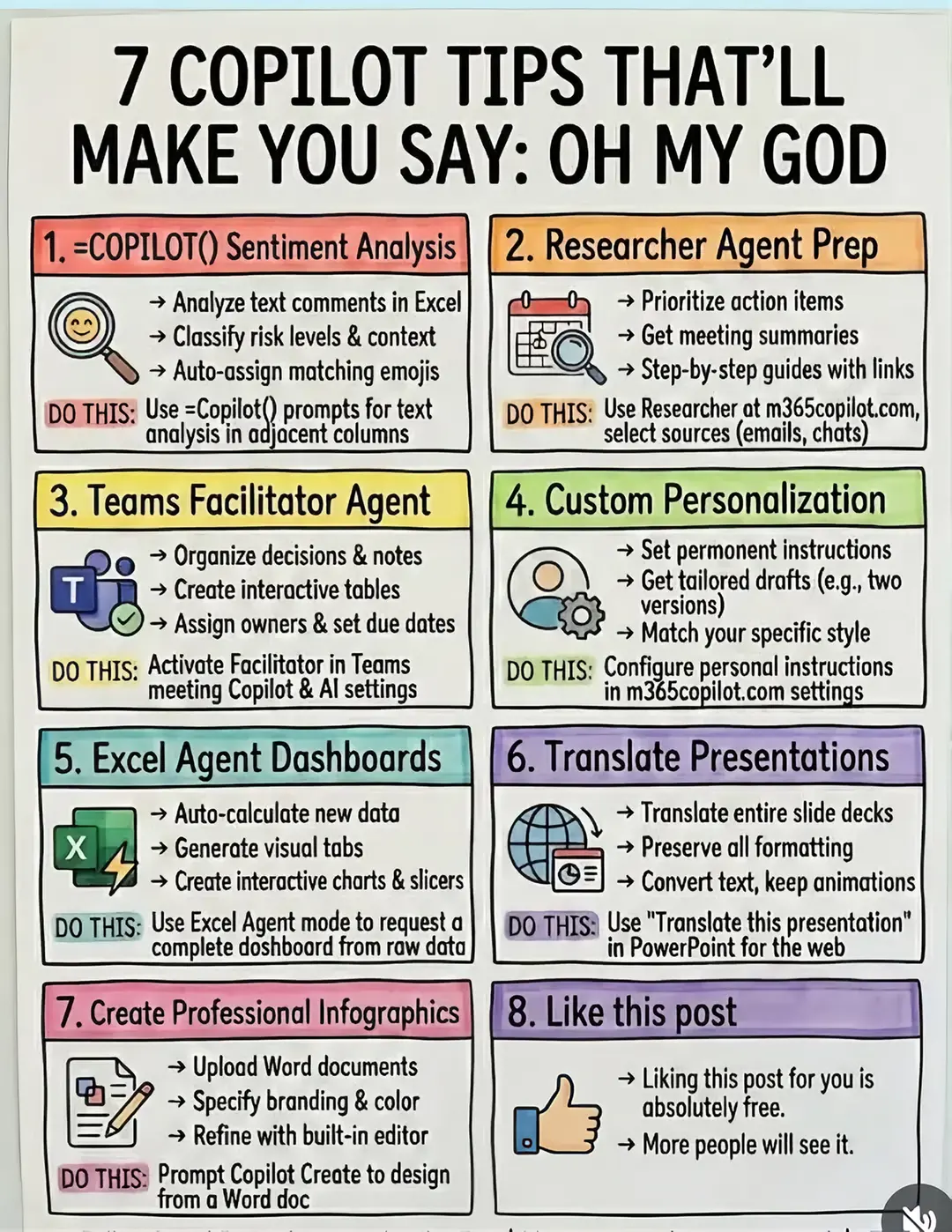
7 COPILOT TIPS THAT'LL MAKE YOU SAY: OH MY GOD
Introduction of 7 Copilot tips
Tip 1: Sentiment Analysis in Excel
Tip 2: Researcher Agent Prep
Tip 3: Teams Facilitator Agent
Tip 4: Custom Personalization
Tip 5: Excel Agent Dashboards
Tip 6: Translate Presentations
Tip 7: Create Professional Infographics
Tip 8: Call to action to like the post
Copilot ACTS: It is used to analyze text comments, classify risk levels, auto-assign emojis, prepare research summaries, create interactive tables, set instructions, generate drafts, configure settings, auto-calculate data, generate visual tabs, create charts, translate presentations, and design infographics. Removing these capabilities would change what happens in the video. Microsoft ACTS: It is the company behind Copilot and its associated tools like Excel, Teams, and PowerPoint. Removing Microsoft would change the context of the tools being used. m365copilot.com ACTS: It is the website where the Researcher agent can be used. Removing it would prevent access to that specific function. PowerPoint ACTS: It is used to translate presentations. Removing it would prevent that specific function. Word ACTS: It is used to create infographics. Removing it would prevent that specific function. Excel ACTS: It is used for sentiment analysis and dashboard creation. Removing it would prevent those specific functions. Teams ACTS: It is used for the Facilitator Agent. Removing it would prevent that specific function.
Like this post

Promotes 1 product. Create free account to see more.
Outliers and viral hits: their videos on Overshot, all time.