Loading video…
All breakouts

3.5Text-HeavyListicle hookSaaS
Hook
TOP 7 WAYS Use Claude inside Copilot
@parm.ai
3.6K followers · usually 1.6K views a post
Views
2.4K
Likes
65
Comments
0
Shares
17
Why it worked
The post effectively showcases practical, tangible benefits of integrating Claude with Microsoft Copilot, addressing specific use cases across popular applications. By demonstrating how the AI enhances existing workflows rather than replacing them, it appeals to users looking for productivity gains and deeper insights.
Summary
This carousel post demonstrates 7 practical ways to use Claude AI within Microsoft Copilot and its integrated applications like Word, Excel, and PowerPoint. It highlights how Claude can enhance workflows by providing clearer reasoning, deeper research capabilities, and improved document drafting, data analysis, and presentation creation.
Structure
- 1Introduction to using Claude within Copilot
- 2Using Claude in Copilot Chat for reasoning and synthesis
- 3Leveraging Claude for deep research and report generation
Original caption
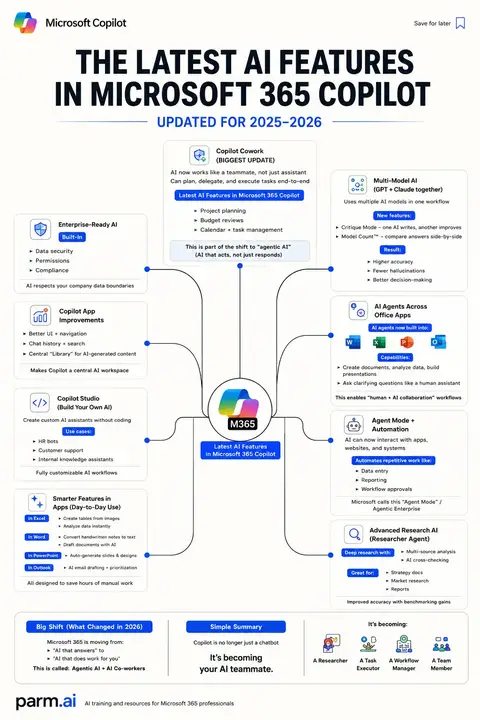
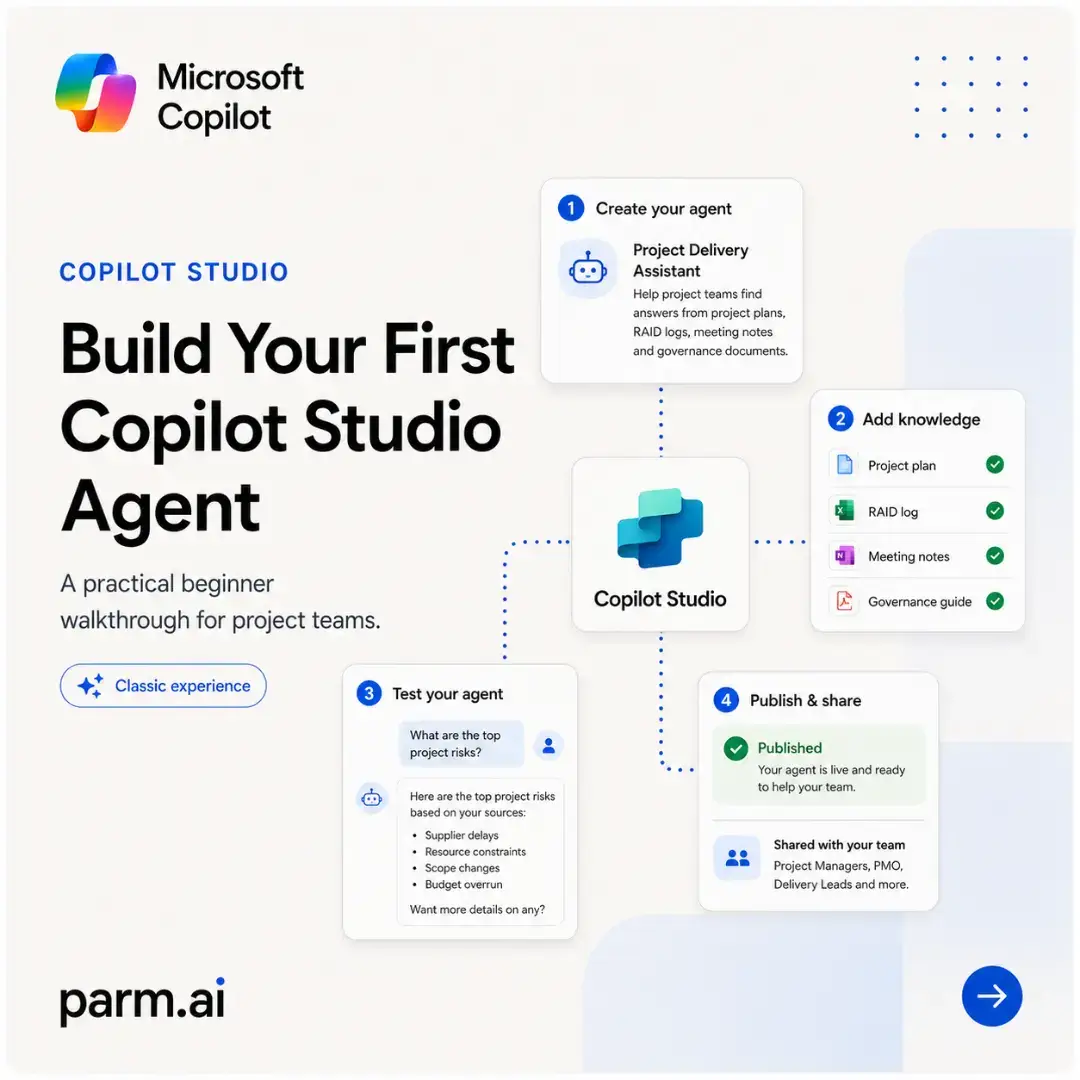
Claude Didn’t Replace Copilot — It Just Gave It Another Brain 🧠 Microsoft Copilot is no longer built around one fixed AI experience. Inside supported Microsoft 365 environments, you can now choose Claude for specific types of work — while continuing to operate inside the Copilot interface, your Microsoft 365 apps and your organisation’s existing workflow. 1. Think through complex work in Copilot Chat Claude can be particularly useful when a request involves long documents, competing priorities or several connected decisions. You can ask it to compare project files, identify contradictions, surface hidden dependencies and turn scattered information into a structured action plan. The result is less “give me an answer” and more “help me think this through properly.” 2. Run deeper investigations with Researcher 🔎 This can help with competitor reviews, policy analysis, supplier assessments, market research and executive briefing papers. Model Council adds another useful layer by comparing how Claude and GPT approach the same research question — highlighting where they agree, where they differ and which model contributes a perspective the other missed. 3. Improve long-form documents in Word Claude can help transform rough notes into clear business writing without losing the original meaning. That might involve rewriting a project report for senior leadership, organising a proposal into a stronger narrative, separating decisions from risks or reducing repetition across a lengthy document. The real value is not simply generating more text. It is improving the structure, clarity and usefulness of the text you already have. ✍️ 4. Analyse workbooks in Excel Inside Excel, Claude can support formula creation, anomaly detection, trend analysis and workbook restructuring. For example, you could ask it to review a project portfolio, identify which initiatives are most exposed to delay and create a new prioritisation column based on risk, status and delivery dates. That moves Copilot beyond explaining the spreadsheet and towards helping you improve it. 5. Build stronger presentations in PowerPoint 📊 Claude can help convert source material into a sharper presentation narrative. A long report can become an executive deck. A cluttered slide can be rewritten. Missing sections can be identified. A presentation can be reorganised around the decisions the audience actually needs to make. The strongest use case is not “make me some slides.” It is: Turn this complex body of information into a clear story for a specific audience. 6. Coordinate multi-step work with Cowork Cowork represents a bigger shift. Instead of producing one isolated answer, Claude can help coordinate work that spans several Microsoft 365 applications — such as preparing a report, creating a workbook, building a presentation, drafting follow-up emails and organising a meeting. One brief can become a connected set of deliverables. That is the difference between asking AI for advice and delegating a defined outcome. ⚙️ 7. Build Claude-powered agents in Copilot Studio The most advanced use case is turning Claude into part of a reusable business process. A custom agent could review project documentation against governance standards, answer questions from approved policy sources, identify missing evidence or escalate an issue to the correct owner. Instead of repeating the same prompt every week, the organisation builds the logic once and makes it available as a governed capability. The bigger lesson Use Claude when you need deeper synthesis, careful structure, long-context reasoning or a more deliberate approach to complex information. Use Copilot as the environment that connects that intelligence to the documents, data, presentations, communications and workflows where the work already happens. That combination is where the real productivity gain begins. 🚀 #MicrosoftCopilot #ClaudeAI #Microsoft365 #ArtificialIntelligence #FutureOfWork
More from @parm.ai
More breakout videos from this creator.